Lunduke
News • Science & Tech
How to leak info to The Lunduke Journal (anonymously and securely)
Ready to be a Whistleblower? Here's how.
December 21, 2023

Work at a Big Tech Company (or Foundation) or on a big open source project?  Seeing something happening that the public should know about?  Afraid to step forward for fear of losing your job?

Allow me to walk you through exactly how to leak information -- directly to The Lunduke Journal -- while maintaining your anonymity.

Prepare the material

Let's say you see some of the following:

  • Shady business practices.
  • Political craziness.
  • Poor employee or contributor treatment.
  • Other, various shenanigans that you feel should be publicly known.

If you have files or information about it -- including screenshots, documents, videos, or any other type of file... 

Check to see if your name, email address, or other information which could be used to identify you as the source is included in the file.  If so, it is recommended that you black out that information (such as by using a paint program) prior to sending it to The Lunduke Journal.

The Lunduke Journal will work extremely hard to keep your identity confidential -- Metadata of files will be scrubbed, and file names will be changed prior to publication.

Use an anonymous or private email account

This is, perhaps, the most important rule to follow:

  • Do not use your work email account when contacting The Lunduke Journal.

The Lunduke Journal has a firm policy of not revealing any personal information of sources (including email addresses).  If you feel comfortable using a personal email account, you may do so.

However, if you want to take that extra level of protection, an anonymous email account is recommended.

  • Get a free, anonymous email account from Proton Mail (or another anonymous email service that you trust).
  • Use that email account to contact "bryan at lunduke.com".

How much personal information you use in our communication is entirely up to you (your name, your job title, etc.).

How to send files

If you have files you need to send -- screenshots, email backups, documents, videos, etc. -- there are multiple options depending on your needs.

If your files are relatively small (only a few MB), you can simply include them as an email attachment to "bryan at lunduke.com".

However, if the files you need to send are much larger, you'll want to use an anonymous file sharing tool.

I recommend https://send.vis.ee/.  It is an open source tool which allows you to anonymously upload (no account needed) any file up to 2.5 GB in size, with passwords and private links which expire.  Very, very handy when sending this type of whistleblower data.

  1. Go to https://send.vis.ee/
  2. Select the file you wish to upload.
  3. Set the terms for when the download link expires (and the files are deleted) -- I recommend setting it to "Expires after 1 download or 3 days".  This gives me enough time to grab the file, but makes sure it doesn't linger around.
  4. Set a password for the file.  Extra security is always good.
  5. Then email "bryan at lunduke.com" with the download link that Send.vis.ee provides you, along with the password you chose.
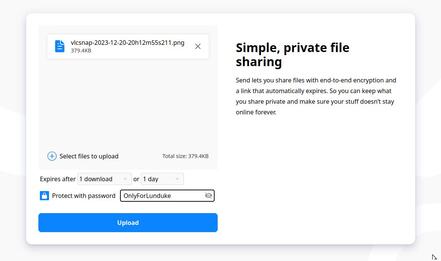
Using this method of contacting The Lunduke Journal -- and sending files -- ensures that your identity remains anonymous (unless you wish for the public to know who you are).

That said, there are other options as well.  Some choose to place files into a personal file sharing service and provide a link.  Use whatever you are most comfortable with.  If you have questions, feel free to ask.

What happens then?

All information is looked at, researched, and carefully verified (as necessary).  At this point I may have additional questions for you -- so watch your email inbox.

Not all leaked data is used -- or used immediately.  But everything is evaluated.

Questions?  Email "bryan at lunduke.com".

community logo
Join the Lunduke Community
To read more articles like this, sign up and join my community today
8
What else you may like…
Videos
Podcasts
Posts
Articles
GNOME in Damage Control Mode After Revelations from Ex Board Member

Following reports of corruption, from an ousted Board member, the GNOME Foundation censors discussions, blames "well-known bad actors and grifters".

Grab a Discounted Lifetime Sub & Get on the Wall:
https://lunduke.substack.com/p/50-off-yearly-and-massively-discounted

More from The Lunduke Journal:
https://lunduke.com/

00:14:59
Proton Mail Apologizes for Sponsoring "Far Right French YouTuber"

Activists on Reddit attacked Proton Mail for advertising with a YouTuber accused of "far-right positioning". Proton quickly caved to the mob and apologized.

Grab a discounted Lifetime Sub & get on the Wall:
https://lunduke.substack.com/p/50-off-yearly-and-massively-discounted

More from The Lunduke Journal:
https://lunduke.com/

00:20:14
Ex Board Member Reveals Corruption & Dysfunction at GNOME Foundation

Unpaid invoices. Threats. Secret bannings of Elected Board Members.
Non-Disparagement Agreements. "Hiding crucial information about staff".

Grab a Discounted Lifetime Subscription & Get on The Wall:
https://lunduke.substack.com/p/50-off-yearly-and-massively-discounted

More from The Lunduke Journal:
https://lunduke.com/

00:26:38
November 22, 2023
The futility of Ad-Blockers

Ads are filling the entirety of the Web -- websites, podcasts, YouTube videos, etc. -- at an increasing rate. Prices for those ad placements are plummeting. Consumers are desperate to use ad-blockers to make the web palatable. Google (and others) are desperate to break and block ad-blockers. All of which results in... more ads and lower pay for creators.

It's a fascinatingly annoying cycle. And there's only one viable way out of it.

Looking for the Podcast RSS feed or other links? Check here:
https://lunduke.locals.com/post/4619051/lunduke-journal-link-central-tm

Give the gift of The Lunduke Journal:
https://lunduke.locals.com/post/4898317/give-the-gift-of-the-lunduke-journal

The futility of Ad-Blockers
November 21, 2023
openSUSE says "No Lunduke allowed!"

Those in power with openSUSE make it clear they will not allow me anywhere near anything related to the openSUSE project. Ever. For any reason.

Well, that settles that, then! Guess I won't be contributing to openSUSE! 🤣

Looking for the Podcast RSS feed or other links?
https://lunduke.locals.com/post/4619051/lunduke-journal-link-central-tm

Give the gift of The Lunduke Journal:
https://lunduke.locals.com/post/4898317/give-the-gift-of-the-lunduke-journal

openSUSE says "No Lunduke allowed!"
September 13, 2023
"Andreas Kling creator of Serenity OS & Ladybird Web Browser" - Lunduke’s Big Tech Show - September 13th, 2023 - Ep 044

This episode is free for all to enjoy and share.

Be sure to subscribe here at Lunduke.Locals.com to get all shows & articles (including interviews with other amazing nerds).

"Andreas Kling creator of Serenity OS & Ladybird Web Browser" - Lunduke’s Big Tech Show - September 13th, 2023 - Ep 044
post photo preview
TempleOS arrives on The Lunduke Journal Lifetime Wall

“When are you going to add a TempleOS Lifetime Wall??!”

I’ve lost track of the number of times I’ve received that request over the last few weeks. Well. What the heck! Why not?

There are now three Lunduke Journal Lifetime Subscriber Walls (displayed both on Lunduke.com and the end of all new shows) with space available:

  • Macintosh System 1

  • Windows 2000

  • TempleOS


A few quick notes:

  1. The Windows 2000 Wall, which was introduced only 2 days ago, is already about half way full. At the current rate, that one will likely be full by the end of the week. Still plenty of space on the Mac System 1 Wall.

  2. The discount on Lifetime Subscriptions ($125… discounted from the normal $300) runs through the end of June.

  3. One Lifetime Subscription = Name Listed on One Wall. These Walls are crazy popular and fill up super fast, so I have to put that limit in place.

  4. Want your name on more than one Lifetime Wall? Grab a second Lifetime Subscription (use the discounted rate) and you can have your name added to one of the Walls with space still available.

Massive high five to everyone who has supported The Lunduke Journal and made these retro-computer Lifetime Walls so much fun to do!

-Lunduke

Read full Article
post photo preview
Behold! The "Win 2K" & "Mac System 1" Lifetime Sub Walls!

Woah! The 8th Lifetime Subscriber Wall of The Lunduke Journal (aka “The Windows 1.0 Wall”) is already full! After only one week! That’s nuts!

So I’m opening up two new, retro computer walls!

  • Wall 9 - “The Macintosh System 1 Wall”

  • Wall 10 - “The Windows 2000 Wall”


Show your support for The Lunduke Journal, and be immortalized in a retro computer screenshot. Win-win!

If the past is any indicator, these will fill up crazy fast. First come, first served.

Plus: For the entire month of June, Lifetime Subscriptions are discounted down to $125 (regularly $300).

  1. Scroll down and grab a new Lifetime Subscription (at that bonkers discount).

  2. Choose which of the two new Walls you’d like to be on (Mac System 1 or Windows 2000). Totally optional.

How to Grab a Discounted Lifetime Subscription:

There are 3 different ways to pick up a Lunduke Journal Lifetime sub. All of them work great and include the same perks. Choose whichever works best for you!

Get a Lifetime Subscription via Locals:

  1. Go to Lunduke.Locals.com/support.

  2. Select “Give Once“.

  3. Enter “125“ into the amount field.

  4. After checking out, Lunduke will toss you an email once your account is set to full lifetime status. (This usually happens within a few hours.)

Get a Lifetime Subscription via Substack:

  1. Go to Lunduke.Substack.com/subscribe.

  2. Select the “Lifetime Subscription” option.

  3. After checking out, Lunduke will toss you an email once your account is set to full lifetime status. (This usually happens within a few hours.)

If you would also like full, Lifetime access to Lunduke.Locals.com (which is included):

  1. Make a free account on Lunduke.Locals.com.

  2. Email “bryan at lunduke.com” with the email address you use on both Substack and Locals (can be different email addresses).

  3. Lunduke will toss you an email once your account is set to full lifetime status on Locals.

Get a Lifetime Subscription with Bitcoin:

Bonus: Save an extra $10 with the Bitcoin option, as Bitcoin processing has fewer fees associated with it.

bc1qyjakve8fywm8pz2v99v57yhjj0vzr2vjze6fcq

  • Email “bryan at lunduke.com” with the following information: What time you made the transaction, how much was sent (in Bitcoin), and the email address you use (or plan to use) on Locals.com or Substack.com.

-Lunduke

Read full Article
Windows 1.0 Wall almost full! Last call!

Holy Guacamole, Batman!

The 8th Lifetime Subscriber Wall (“The Windows 1.0 Wall”) of The Lunduke Journal launched exactly one week ago… and it’s already almost full! Bonkers!


At the current rate, the “Windows 1.0 Wall” will be full sometime tomorrow (Saturday).

Want your name immortalized in that glorious 1985 styled goodness, proclaiming to the world your support of The Lunduke Journal?

Don’t have a Lifetime Subscription?

  1. Grab one for $125 (normally $300).

  2. You’ll get a confirmation email (within just a few hours). Reply to that email with how you would like your name displayed on a Lifetime Wall.

  3. Then enjoy the other perks of being Lunduke Journal subscriber. Forum access, MP4 downloads, and PDF eBooks.

Already have a Lifetime Subscription?

  1. Just toss an email to bryan [at] lunduke.com with how you would like your name displayed on a Lifetime Wall.

Easy peasy.

First come, first served. Once the “Windows 1.0 Wall” is full, the final version will be added to Lunduke.com and the 9th Lifetime Wall will debut!

-Lunduke

Read full Article
See More
Available on mobile and TV devices
google store google store app store app store
google store google store app tv store app tv store amazon store amazon store roku store roku store
Powered by Locals