Lunduke
News • Science & Tech
Who (really) created the "Byte"?
And what is the REAL definition of term?
May 06, 2024
post photo preview

Kilobytes (KB). Megabytes (MB). Gigabytes (GB).

We use these storage measurements every single, gosh-darned day. And most of us feel like we know exactly what they mean. But do we really?

Do we really — truly — know what a “Byte” is… and its origin? I mean… who came up with the term “Byte”, anyway?

Let’s take a moment to look over the history of the term. If, for no other reason, than to feel smarter than most other nerds.

What is a “Byte”?

If you ask Mr. Google, a Byte is exactly 8 Bits.
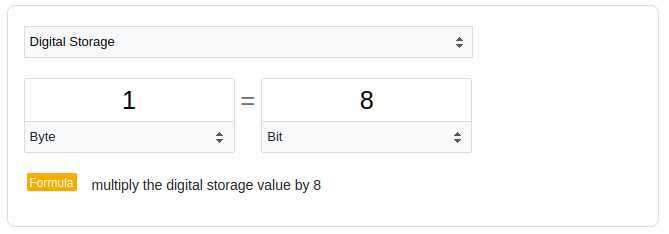
Mr. Google wouldn't lie... right?

Ok. Great. 8 Bits = 1 Byte.

So what is a Bit?

That part is simple.

A Bit is the smallest unit of information for a digital computer. A Bit can have two possible values… 0 or 1. It is a boolean. A binary.

Many people believe “Bit” is short for “Bite”. You find this in many computer history books. This little tidbit has been repeated so often, many believe it. However, like many such oft-repeated anecdotes in computing… it’s hogwash.

In fact, “Bit” is an acronym for “Binary Information Digit”. Squish that phrase together and you get “Bit”.

Fun factoids about the origin of the “Bit”

The first usage of the word “bit”, when talking about a type of data in reference to computing, was by Vannevar Bush. He published an articled entitled “Instrumental Analysis” in the October, 1936 issue of “American Mathematical Society”. In it he used the phrase “bits of information” when talking about punch cards.

However 

“Bit” was commonly used in Middle English to refer to “a mouthful” or a “morsel” of food. (This is the origin of why many believe “Bit” is short for “Bite”… even though it isn’t.) As such, Vannevar Bush may not have actually been thinking about a “Bit” as a “Binary digit”… instead he may simply have thought “this is a morsel of data”. Also worth noting… Bush never actually defines what a “bit” is. Making it likely that he was simply using the word “bit” in the Middle English way.

The first — distinctly verifiable — usage of “Bit” in this way is by John Tukey. From “A Mathematical Theory of Communication” written by C. E. Shannon in 1949:

“The choice of a logarithmic base corresponds to the choice of a unit for measuring information. If the base 2 is used the resulting units may be called binary digits, or more briefly bits, a word suggested by J. W. Tukey. A device with two stable positions, such as a relay or a flip-flop circuit, can store one bit of information.”

There you have it. More information about the origin of the term “bit” than you ever wanted to know.

You’re welcome.

Ok. Great.

So, in short, a Bit is a 0 or 1. And a Byte is a group of 8 Bits. Easy.

Not so fast there, sport!

While the Byte being 8 Bits is commonly accepted today… that was not always the case. Not by a long shot!

In fact, there are two competing stories for who created the term “Byte”… and neither of them were referring to a set of 8 Bits!

Seriously!

Werner Buchholz’s 6 Bits

The most often cited creator of the term “Byte” is Werner Buchholz — who used the term, in 1956, to refer to a grouping of 6 Bits when working on the IBM Stretch Super computer.
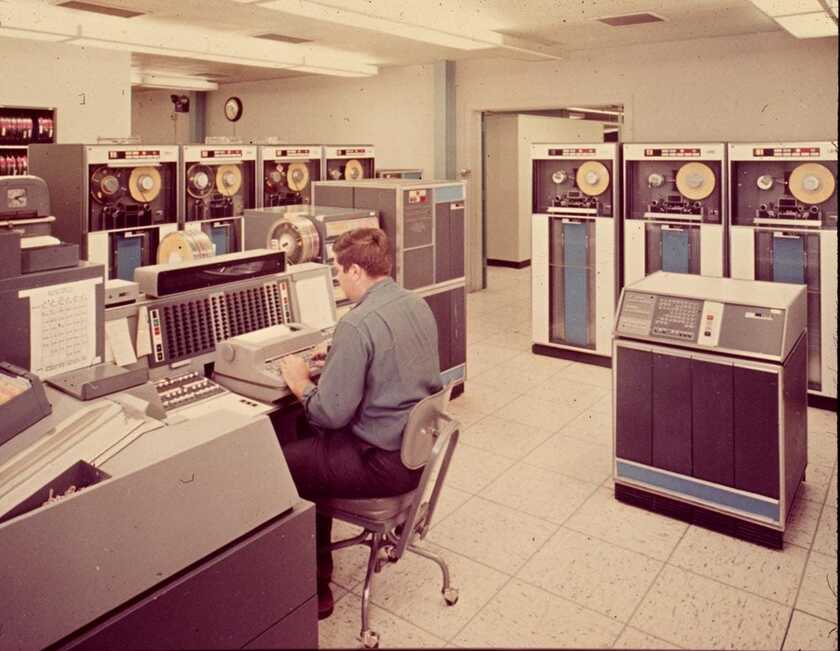
Man sitting at IBM Stretch console. Image source: computer-history.info.

A “6 Bit” Byte was common in those days. In fact, Braille was a 6 Bit encoding of characters for the blind. And many of the early computers (from IBM and others) used 6 Bit groupings to encode character data.

6 Bits -- not 8 Bits -- per Byte.

However (you knew there had to be a “however”)…

Louis G. Dooley’s N Bits

Around that same time (1956 or so), Louis Dooley first used the word “Byte” to refer to an undefined grouping of “Bits”. But, typically, used as “4 Bits”.

That's right.  Not 8 Bits.  Not 6 Bits.  But 4 Bits.

Dooley published the following letter in BYTE magazine:

“I would like to get the following on record: The word byte was coined around 1956 to 1957 at MIT Lincoln Laboratories within a project called SAGE (the North American Air Defense System), which was jointly developed by Rand, Lincoln Labs, and IBM. In that era, computer memory structure was already defined in terms of word size. A word consisted of x number of bits; a bit represented a binary notational position in a word. Operations typically operated on all the bits in the full word.


We coined the word byte to refer to a logical set of bits less than a full word size. At that time, it was not defined specifically as x bits but typically referred to as a set of 4 bits, as that was the size of most of our coded data items. Shortly afterward, I went on to other responsibilities that removed me from SAGE. After having spent many years in Asia, I returned to the U.S. and was bemused to find out that the word byte was being used in the new microcomputer technology to refer to the basic addressable memory unit.


Louis G. Dooley
Ocala, FL”

So… what the heck is a “Byte”?!

That’s right. We now have two very, very different definitions for the word “Byte”. Both creations of the word happened independently… and at almost the exact same moment in time.

  • The Buchholz Byte” - A grouping of 6 Bits.
  • The Dooley Byte” - A grouping of an undefined number of bits, less than a full word size. Often used to describe 4 Bits.

You’ll note that neither of these definitions — from the men who created the term — have the number “8” in them.

The shift towards 8 Bits per Byte started to happen in the 1970s… with the development and gaining popularity of 8-Bit processors, such as the legendary Intel 8008.
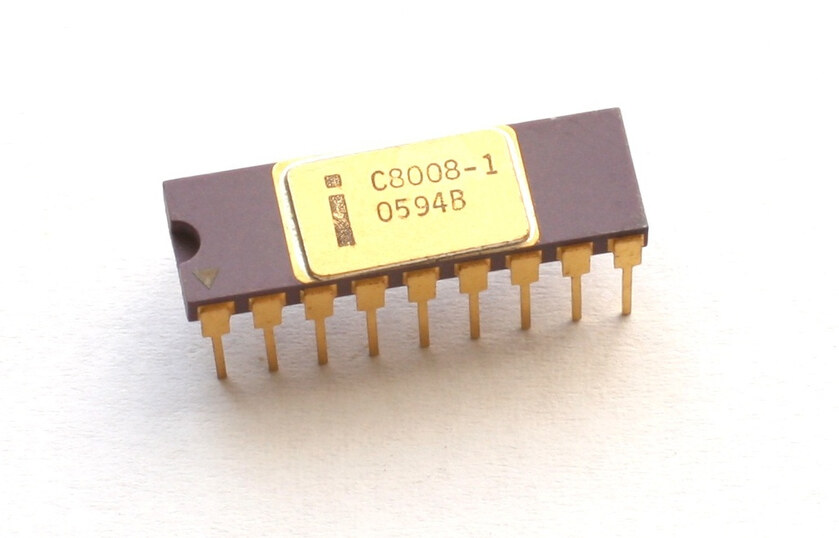
A revision of the Intel 8008 CPU

Interestingly, some of those early 8-Bit CPU’s had specific functions for handling 4-Bit chunks of data. Because, up until that point, 4 and 6-Bit “Bytes” were incredibly common (including in the predecessor to the Intel 8008… the 4-Bit Intel 4004).

Fun Factoid: Nowadays a 4-Bit group is called a “Nibble”. Which is adorable.

For quite some time the term “octet” or “octad” was used to denote 8 Bit groups. At some point along the way, most people phased that out as well… simply referring to all “groups of bits” as a “Byte”. Though you will still find “octet” used here and there, especially when talking about various network protocols.

All of which means…

Dooley invented the modern “Byte”… not Buchholz

While many writers, enthusiasts, and computer historians are quick to say that Werner Buchholz coined the term “Byte”… they are obviously mistaken.

Besides the fact that it’s hard to discern who (Dooley or Buchholz) actually used the term first… the Buchholz definition is no longer used at all in modern computing.

The Buchholz definition is specific. 6 Bits. Which modern computing has determined is not the amount of Bits in a modern Byte.

The Dooley definition, on the other hand, allows for wiggle room. Which means that an 8 Bit “Byte” would fit the Dooley definition. But not the Buchholz.

The facts are clear: Louis G. Dooley created the word “Byte”. At least as it has been used for the last 40+ years.

But Buchholz — an absolute legend in the computing world — gets one heck of an Honorable Mention trophy.


community logo
Join the Lunduke Community
To read more articles like this, sign up and join my community today
20
What else you may like…
Videos
Podcasts
Posts
Articles
AI Generated Patches to Linux Kernel Hits New Record High

8% of all code submissions to the Linux Kernel are now Al generated.

Grab a discounted Lifetime Sub & get on the Wall:
https://lunduke.substack.com/p/behold-the-win-2k-and-mac-system

More from The Lunduke Journal:
https://lunduke.com/

00:14:24
Linux Logos on Racecars

The Omarchy Linux logo is on a Le Mans racecar, driven by the project founder.

Grab a discounted Lifetime Sub & get on the Wall:
https://lunduke.substack.com/p/behold-the-win-2k-and-mac-system

More from The Lunduke Journal:
https://lunduke.com/

00:07:41
XLibre Turns One Year Old

"XLibre is the most actively developed community-maintained X11 display server."

Grab a discounted Lifetime Sub & get on the Wall:
https://lunduke.substack.com/p/behold-the-win-2k-and-mac-system

More from The Lunduke Journal:
https://lunduke.com/

00:13:48
November 22, 2023
The futility of Ad-Blockers

Ads are filling the entirety of the Web -- websites, podcasts, YouTube videos, etc. -- at an increasing rate. Prices for those ad placements are plummeting. Consumers are desperate to use ad-blockers to make the web palatable. Google (and others) are desperate to break and block ad-blockers. All of which results in... more ads and lower pay for creators.

It's a fascinatingly annoying cycle. And there's only one viable way out of it.

Looking for the Podcast RSS feed or other links? Check here:
https://lunduke.locals.com/post/4619051/lunduke-journal-link-central-tm

Give the gift of The Lunduke Journal:
https://lunduke.locals.com/post/4898317/give-the-gift-of-the-lunduke-journal

The futility of Ad-Blockers
November 21, 2023
openSUSE says "No Lunduke allowed!"

Those in power with openSUSE make it clear they will not allow me anywhere near anything related to the openSUSE project. Ever. For any reason.

Well, that settles that, then! Guess I won't be contributing to openSUSE! 🤣

Looking for the Podcast RSS feed or other links?
https://lunduke.locals.com/post/4619051/lunduke-journal-link-central-tm

Give the gift of The Lunduke Journal:
https://lunduke.locals.com/post/4898317/give-the-gift-of-the-lunduke-journal

openSUSE says "No Lunduke allowed!"
September 13, 2023
"Andreas Kling creator of Serenity OS & Ladybird Web Browser" - Lunduke’s Big Tech Show - September 13th, 2023 - Ep 044

This episode is free for all to enjoy and share.

Be sure to subscribe here at Lunduke.Locals.com to get all shows & articles (including interviews with other amazing nerds).

"Andreas Kling creator of Serenity OS & Ladybird Web Browser" - Lunduke’s Big Tech Show - September 13th, 2023 - Ep 044
June 08, 2026

That was the most boring WWDC keynote I’ve ever seen.

Repromising the things they sold me for my iPhone 2 years ago and never delivered.

I’m an Apple fan, I have LOTS of Apple products. Other than the AirPods Max, every Apple product I own will be replaced by another one someday.

I can only hope they told the truth that they were fixing bugs and focusing on performance improvements instead of lots of new features for MacOS.

I like AI - and all their AI features except the reperspective on the photo were late, meh or invented by Google.

I’ll use AI in all my Apple products, like I already am…from OpenAI, Anthropic, Grok and Gemini.

Oh, voice short cuts also looked cool.

Apple must not be allowing their employees the use of AI software development

I made a post about Moebius² (my fork of Moebius, the ANSI editor that had not had updates in over 3 years) - well I've been breathing more life into it lately, and brought it some really neat new features.

https://mas.erb.pw/@meatlotion/116718826690324410

June 07, 2026

In Search of Vulnerabilities

How real is the threat of AI to OSS? How powerful is AI in doing code and security reviews? I already regularly benefit from AI code and security review of my own work. It’s not even a close call, it is OBVIOUSLY powerful and helpful. But what about all that AI Slop PR’s that are plaguing OSS?

So I picked an OSS that is popular, currently maintained and isn’t “millions and millions” of lines of code. It’s a web server, and that’s all I’m going to say about which project. It’s written in C. I’m not a C developer of any kind. I’m not a security expert of any kind. I’ve never hacked into anything in my life - I’m not a hacker of any kind.

But I have a subscription to ChatGPT/Codex.

I pull down the code and have Codex do a review with Gpt 5.5 high. Code and security review, and explicitly told it to ignore anything trivial. I’m looking for zero days and other “we must fix this now!” issues. The code passed review with no major issues...

post photo preview
TempleOS arrives on The Lunduke Journal Lifetime Wall

“When are you going to add a TempleOS Lifetime Wall??!”

I’ve lost track of the number of times I’ve received that request over the last few weeks. Well. What the heck! Why not?

There are now three Lunduke Journal Lifetime Subscriber Walls (displayed both on Lunduke.com and the end of all new shows) with space available:

  • Macintosh System 1

  • Windows 2000

  • TempleOS


A few quick notes:

  1. The Windows 2000 Wall, which was introduced only 2 days ago, is already about half way full. At the current rate, that one will likely be full by the end of the week. Still plenty of space on the Mac System 1 Wall.

  2. The discount on Lifetime Subscriptions ($125… discounted from the normal $300) runs through the end of June.

  3. One Lifetime Subscription = Name Listed on One Wall. These Walls are crazy popular and fill up super fast, so I have to put that limit in place.

  4. Want your name on more than one Lifetime Wall? Grab a second Lifetime Subscription (use the discounted rate) and you can have your name added to one of the Walls with space still available.

Massive high five to everyone who has supported The Lunduke Journal and made these retro-computer Lifetime Walls so much fun to do!

-Lunduke

Read full Article
post photo preview
Behold! The "Win 2K" & "Mac System 1" Lifetime Sub Walls!

Woah! The 8th Lifetime Subscriber Wall of The Lunduke Journal (aka “The Windows 1.0 Wall”) is already full! After only one week! That’s nuts!

So I’m opening up two new, retro computer walls!

  • Wall 9 - “The Macintosh System 1 Wall”

  • Wall 10 - “The Windows 2000 Wall”


Show your support for The Lunduke Journal, and be immortalized in a retro computer screenshot. Win-win!

If the past is any indicator, these will fill up crazy fast. First come, first served.

Plus: For the entire month of June, Lifetime Subscriptions are discounted down to $125 (regularly $300).

  1. Scroll down and grab a new Lifetime Subscription (at that bonkers discount).

  2. Choose which of the two new Walls you’d like to be on (Mac System 1 or Windows 2000). Totally optional.

How to Grab a Discounted Lifetime Subscription:

There are 3 different ways to pick up a Lunduke Journal Lifetime sub. All of them work great and include the same perks. Choose whichever works best for you!

Get a Lifetime Subscription via Locals:

  1. Go to Lunduke.Locals.com/support.

  2. Select “Give Once“.

  3. Enter “125“ into the amount field.

  4. After checking out, Lunduke will toss you an email once your account is set to full lifetime status. (This usually happens within a few hours.)

Get a Lifetime Subscription via Substack:

  1. Go to Lunduke.Substack.com/subscribe.

  2. Select the “Lifetime Subscription” option.

  3. After checking out, Lunduke will toss you an email once your account is set to full lifetime status. (This usually happens within a few hours.)

If you would also like full, Lifetime access to Lunduke.Locals.com (which is included):

  1. Make a free account on Lunduke.Locals.com.

  2. Email “bryan at lunduke.com” with the email address you use on both Substack and Locals (can be different email addresses).

  3. Lunduke will toss you an email once your account is set to full lifetime status on Locals.

Get a Lifetime Subscription with Bitcoin:

Bonus: Save an extra $10 with the Bitcoin option, as Bitcoin processing has fewer fees associated with it.

bc1qyjakve8fywm8pz2v99v57yhjj0vzr2vjze6fcq

  • Email “bryan at lunduke.com” with the following information: What time you made the transaction, how much was sent (in Bitcoin), and the email address you use (or plan to use) on Locals.com or Substack.com.

-Lunduke

Read full Article
Windows 1.0 Wall almost full! Last call!

Holy Guacamole, Batman!

The 8th Lifetime Subscriber Wall (“The Windows 1.0 Wall”) of The Lunduke Journal launched exactly one week ago… and it’s already almost full! Bonkers!


At the current rate, the “Windows 1.0 Wall” will be full sometime tomorrow (Saturday).

Want your name immortalized in that glorious 1985 styled goodness, proclaiming to the world your support of The Lunduke Journal?

Don’t have a Lifetime Subscription?

  1. Grab one for $125 (normally $300).

  2. You’ll get a confirmation email (within just a few hours). Reply to that email with how you would like your name displayed on a Lifetime Wall.

  3. Then enjoy the other perks of being Lunduke Journal subscriber. Forum access, MP4 downloads, and PDF eBooks.

Already have a Lifetime Subscription?

  1. Just toss an email to bryan [at] lunduke.com with how you would like your name displayed on a Lifetime Wall.

Easy peasy.

First come, first served. Once the “Windows 1.0 Wall” is full, the final version will be added to Lunduke.com and the 9th Lifetime Wall will debut!

-Lunduke

Read full Article
See More
Available on mobile and TV devices
google store google store app store app store
google store google store app tv store app tv store amazon store amazon store roku store roku store
Powered by Locals