Lunduke
News • Science & Tech
The CIA, NSA, and Pokémon Go
June 16, 2024
post photo preview

Back in July of 2016, I wrote a short article for Network World entitled “The CIA, NSA, and Pokémon Go."

While the title was certainly viewed as a bit “over the top” and “conspiracy theorist-y”, it was really just a collection of (in my opinion, rather bizarre) facts that – even without any sinister connection – were worth documenting. I am republishing it here, with some additional (increasingly odd) details added at the end (including radio and TV appearances related to this article).

Some of the details relating to the exact permissions and capabilities of the Pokémon application have changed over the last few years… but everything else remains correct, factual, and up to date.


The CIA, NSA, and Pokémon Go

With Pokémon Go currently enjoying, what I would call, a wee-bit-o-success, now seems like a good time to talk about a few things people may not know about the world's favorite new smartphone game.

This is not an opinion piece. I am not going to tell you Pokémon Go is bad or that it invades your privacy. I’m merely presenting verifiable facts about the biggest, most talked about game out there.

Let’s start with a little history

Way back in 2001, Keyhole, Inc. was founded by John Hanke (who previously worked in a “foreign affairs” position within the U.S. government). The company was named after the old “eye-in-the-sky” military satellites. One of the key, early backers of Keyhole was a firm called In-Q-Tel.

In-Q-Tel is the venture capital firm of the CIA. Yes, the Central Intelligence Agency. Much of the funding purportedly came from the National Geospatial-Intelligence Agency (NGA). The NGA handles combat support for the U.S. Department of Defense and provides intelligence to the NSA and CIA, among others.

Keyhole’s noteworthy public product was “Earth.” Renamed to “Google Earth” after Google acquired Keyhole in 2004.

In 2010, Niantic Labs was founded (inside Google) by Keyhole’s founder, John Hanke.

Over the next few years, Niantic created two location-based apps/games. The first was Field Trip, a smartphone application where users walk around and find things. The second was Ingress, a sci-fi-themed game where players walk around and between locations in the real world.

In 2015, Niantic was spun off from Google and became its own company. Then Pokémon Go was developed and launched by Niantic. It’s a game where you walk around in the real world (between locations suggested by the service) while holding your smartphone.

Data the game can access

Let’s move on to what information Pokémon Go has access to, bearing the history of the company in mind as we do.

When you install Pokémon Go on an Android phone, you grant it the following access (not including the ability to make in-app purchases):

Identity

  • Find accounts on the device

Contacts

  • Find accounts on the device

Location

  • Precise location (GPS and network-based)

  • Approximate location (network-based)

Photos/Media/Files

  • Modify or delete the contents of your USB storage

  • Read the contents of your USB storage

Storage

  • Modify or delete the contents of your USB storage

  • Read the contents of your USB storage

Camera

  • Take pictures and videos

Other

  • Receive data from the internet

  • Control vibration

  • Pair with Bluetooth devices

  • Access Bluetooth settings

  • Full network access

  • Use accounts on the device

  • View network connections

  • Prevent the device from sleeping

Based on the access to your device (and your information), coupled with the design of Pokémon Go, the game should have no problem discerning and storing the following information (just for a start):

  • Where you are

  • Where you were

  • What route you took between those locations

  • When you were at each location

  • How long it took you to get between them

  • What you are looking at right now

  • What you were looking at in the past

  • What you look like

  • What files you have on your device and the entire contents of those files

I’m not going to tell people what they should think of all this.

I’m merely presenting the information. I recommend looking over the list of what data the game has access to, then going back to the beginning of this article and re-reading the history of the company.

Update: April 14th, 2020

In March of 2017, a little less than a year after this article was originally published, WikiLeaks released what they called “Vault 7." A series of documents that was purported to be a large leak of CIA related documents focused heavily on hacking and electronic surveillance.

Among those documents was a list of code names, descriptions, and various details around Android specific exploits.

Of the code names listed… almost a third of them were Pokémon names. Between that and the CIA investment (via In-Q-Tel) in Niantic (the company behind Pokémon Go)… I mean, that's just a heck of a lot more Pokémon than one would expect from the CIA.

One other little tidbit:

The original CEO of In-Q-Tel was a man named Gilman Louie. Louie received multiple awards for his work with In-Q-Tel - including CIA Agency Seal Medallions, Director's Award by the Director of the Central Intelligence Agency, and Director of National Intelligence Medallion – which included investing in Keyhole.

Louie now sits on the board of directors of Niantic.

In 2019 alone, Pokémon Go earned $1.4 Billion (USD). As of February 2019, the game had been downloaded over One Billion times.

Update: June 15th, 2024

After this article was originally published, back in 2016, I made a few radio guest appearances to talk about it -- my favorites being for Coast to Coast AM and Fade to Black.  Both of which remain available online.

This was followed by an episode of a TV show, for The History Channel, called "Breaking Mysterious".  That show only received a limited run in the USA, but it remains available via streaming in many other countries in case you want to look it up.

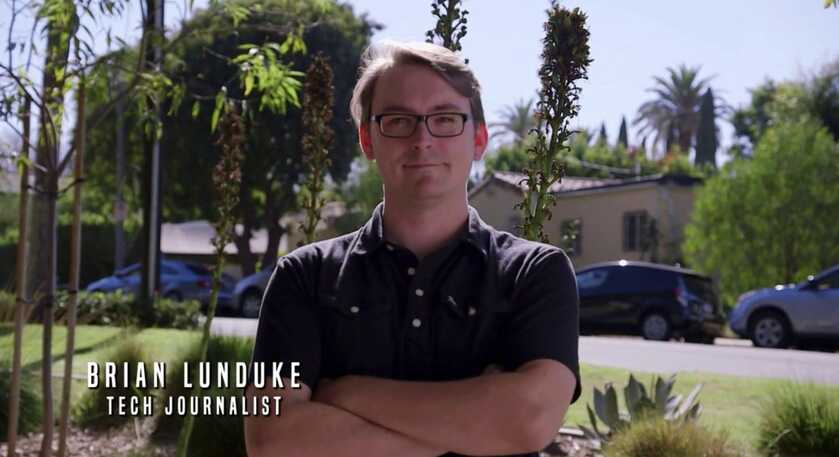
Here's a few snapshots from that episode (Season 1, Episode 1 - "The Watchers") just for good measure.

The show was originally titled "The Unexplained".  But the name was changed to "Breaking Mysterious"... and, later, "The Unexplained" title was used for an entirely different show, hosted by William Shatner.


Yup.  The video editors for the History Channel spelled my name wrong.  (It's with a Y!  A Y, I say!)


Sitting in a park.  Dropping truth bombs about surveillance on the show host, Jimmy Church.


Giving the show's host "The Look".
community logo
Join the Lunduke Community
To read more articles like this, sign up and join my community today
8
What else you may like…
Videos
Podcasts
Posts
Articles
Paid Minimalist Brave Browser? Yes, Please!

Want to pay for a streamlined, minimalist web browser without all the extra features? That's Brave Origin. Bonus: Free for all Linux users.

Remember: If you're not paying for the product, you are the product.

Ubuntu 4.10, C64, & BeOS added to the Wall!
https://lunduke.substack.com/p/ubuntu-410-joins-lunduke-journal

Get on The Wall with a Massively Discounted Lifetime Sub:
https://lunduke.substack.com/p/50-off-yearly-and-massively-discounted

More from The Lunduke Journal:
https://lunduke.com/

00:16:47
Which Operating Systems Are Refusing to Do Age Verification?

As Microsoft, Apple, Google, & many Linux Distros rush to implement Age Verification in their systems, let's walk through which Linux versions are fighting back.

OS Age Verification Status:
https://github.com/BryanLunduke/DoesItAgeVerify

Ubuntu 4.10, C64, & BeOS added to the Wall:
https://lunduke.substack.com/p/ubuntu-410-joins-lunduke-journal

Get on The Wall with a Massively Discounted Lifetime Sub:
https://lunduke.substack.com/p/50-off-yearly-and-massively-discounted

More from The Lunduke Journal:
https://lunduke.com/

00:14:55
Lunduke's Week in Tech: June 14 - June 20, 2026

The Great Linux/BSD Display Server War(tm) continues to rage on!

Links to all the stories:
https://lunduke.substack.com/p/lundukes-week-in-tech-june-14-june

Ubuntu 4.10, C64, & BeOS added to the Wall!
https://lunduke.substack.com/p/ubuntu-410-joins-lunduke-journal

Get on The Wall with a Massively Discounted Lifetime Sub:
https://lunduke.substack.com/p/50-off-yearly-and-massively-discounted

More from The Lunduke Journal:
https://lunduke.com/

00:18:06
November 22, 2023
The futility of Ad-Blockers

Ads are filling the entirety of the Web -- websites, podcasts, YouTube videos, etc. -- at an increasing rate. Prices for those ad placements are plummeting. Consumers are desperate to use ad-blockers to make the web palatable. Google (and others) are desperate to break and block ad-blockers. All of which results in... more ads and lower pay for creators.

It's a fascinatingly annoying cycle. And there's only one viable way out of it.

Looking for the Podcast RSS feed or other links? Check here:
https://lunduke.locals.com/post/4619051/lunduke-journal-link-central-tm

Give the gift of The Lunduke Journal:
https://lunduke.locals.com/post/4898317/give-the-gift-of-the-lunduke-journal

The futility of Ad-Blockers
November 21, 2023
openSUSE says "No Lunduke allowed!"

Those in power with openSUSE make it clear they will not allow me anywhere near anything related to the openSUSE project. Ever. For any reason.

Well, that settles that, then! Guess I won't be contributing to openSUSE! 🤣

Looking for the Podcast RSS feed or other links?
https://lunduke.locals.com/post/4619051/lunduke-journal-link-central-tm

Give the gift of The Lunduke Journal:
https://lunduke.locals.com/post/4898317/give-the-gift-of-the-lunduke-journal

openSUSE says "No Lunduke allowed!"
September 13, 2023
"Andreas Kling creator of Serenity OS & Ladybird Web Browser" - Lunduke’s Big Tech Show - September 13th, 2023 - Ep 044

This episode is free for all to enjoy and share.

Be sure to subscribe here at Lunduke.Locals.com to get all shows & articles (including interviews with other amazing nerds).

"Andreas Kling creator of Serenity OS & Ladybird Web Browser" - Lunduke’s Big Tech Show - September 13th, 2023 - Ep 044
June 22, 2026

The Autonomous Agents: How Real Agent Autonomy Actually Works

The next step in my GenAI journey: Autonomous Agents. If I give an AI direction, it breaks it down into tasks and executes the tasks - that’s automation. And it’s wonderful. Next up - give the AI a mission or goal, have the AI come up with the “how to”, and then set it in a loop to just keep on keeping on. Every loop it considers the goal/mission, considers what’s been done, considers how to improve to enhance the goal.

I set up three autonomous loops:

Three Loops, One Triangle
Since Friday, three concurrent loops have been running on Codex cron automation:
1. snowflake-cost-optimization-builder-loop (hourly) — Built a complete consulting offer from scratch: 30 named target accounts, outreach copy, a Streamlit demo deployed live in a Snowflake trial account, a Python cost report generator, diagnostic SQL tools, a recommendation rules engine, executive brief export, pre/post-call handoff packets, a Monday response ...

post photo preview
June 22, 2026

Lee Chess Making Good Progress

Lee wants to play chess against the computer and friends with LLM coaching. That was the genesis. I also wanted to experiment with autonomous AI development where I can give the AI a Goal, and have it just wake up once an hour and come up with it’s own backlog, prioritize, and then pick a feature to implement.

Alas, I had tried this with the Pi coding harness and the Mimo-V2.5 open weights LLM. Pi doesn’t have an automation feature like Codex and Claude Code do. So, I did the straight “here are my requirements, go build my software. Pi with Mimo-V2.5 (served from openrouter.ai) is wonderful. If I lost the ability to have my $100/mo OpenAI or Anthropic subscription, this would be my current workhorse combination. Not “as good”, but quite good and I was hitting it hard and it only cost $3.41 over three days. 125 million tokens, but with 96% cache rate, the cost was well worth the output.

I am just about up with my $100 Claude subscription so I switched to Claude Code and Opus today to use it before I lose ...

post photo preview
Ubuntu 4.10 joins Lunduke Journal Lifetime Wall!

TL;DR

Ubuntu 4.10, C64, & BeOS Lifetime Walls are now available for Lifetime Subscribers to put their names on! Plus: Lifetime Subscriptions are massively discounted through end of June (roughly 10 days).

Ubuntu 4.10 Lifetime Wall

Remember when Linux was fast, light, and required only 64 MB of RAM?

The Lunduke Journal remembers.

Let’s celebrating those good old days by adding a new “Lifetime Subscriber Wall” of the very first version of Ubuntu (4.10), released all the way back in 2004.

This brings the total number of Lifetime Subscriber Walls up to 14 (fourteen!), with 11 Walls completely, totally filled with the names of Lunduke Journal supporters.

That’s wild!

Three Retro Lifetime Walls Open

Which means there are 3 Walls currently available to put your signature on:

  • Commodore 64 : Half full

  • BeOS R5 : 1/3rd full

  • Ubuntu 4.10 : Just opened


Man. Look at that Ubuntu 4.10 screenshot. So very… GNOME 2… and brown. That, right there, is how I like to remember Ubuntu.

Support The Lunduke Journal & Get on The Wall

Grabbing a Lifetime Subscription to The Lunduke Journal — and getting your name on one of the Retro Computer Lifetime Subscriber Walls — is the best way to show your support for truly independent Tech Journalism.

  1. Grab a Lifetime Subscription (1 name on 1 Wall per Lifetime Subscription), scroll down for the links.

  2. Then Email Lunduke (“[email protected]”) with which Retro Computer Wall you would like to appear on (and what name you would like to use).

Your name will then appear on a Wall… on both Lunduke.com & during the end of Lunduke Journal shows.

Note: These fill up crazy fast. We’re talking days, not weeks. First come, first served. If you want to get on a specific Wall, don’t dilly dally.

Lifetime Discount Runs Through June

For the entire month of June, Lifetime Subscriptions are discounted down to $125 (regularly $300).

How to Grab a Discounted Lifetime Subscription:

There are 3 different ways to pick up a Lunduke Journal Lifetime sub. All of them work great and include the same perks. Choose whichever works best for you!

Get a Lifetime Subscription via Locals:

  1. Go to Lunduke.Locals.com/support.

  2. Select “Give Once“.

  3. Enter “125“ into the amount field.

  4. After checking out, Lunduke will toss you an email once your account is set to full lifetime status. (This usually happens within a few hours.)

Get a Lifetime Subscription via Substack:

  1. Go to Lunduke.Substack.com/subscribe.

  2. Select the “Lifetime Subscription” option.

  3. After checking out, Lunduke will toss you an email once your account is set to full lifetime status. (This usually happens within a few hours.)

If you would also like full, Lifetime access to Lunduke.Locals.com (which is included):

  1. Make a free account on Lunduke.Locals.com.

  2. Email “bryan at lunduke.com” with the email address you use on both Substack and Locals (can be different email addresses).

  3. Lunduke will toss you an email once your account is set to full lifetime status on Locals.

Get a Lifetime Subscription with Bitcoin:

Bonus: Save an extra $10 with the Bitcoin option, as Bitcoin processing has fewer fees associated with it.

bc1qyjakve8fywm8pz2v99v57yhjj0vzr2vjze6fcq

  • Email “bryan at lunduke.com” with the following information: What time you made the transaction, how much was sent (in Bitcoin), and the email address you use (or plan to use) on Locals.com or Substack.com.

-Lunduke

Read full Article
post photo preview
Lunduke's Week in Tech : June 14 - June 20, 2026

Lunduke’s Thoughts of The Week

The Great Linux/BSD Display Server War(tm) continues to rage on!

This week, Valve’s SteamOS finally finished its transition to Wayland by default (demoting Xorg), a move that SteamOS had put off for the last two years. And, just a few days earlier, Slackware (the oldest actively maintained Linux distro) began officially testing XLibre as a replacement for Xorg.

The trend is clear: Xorg is being tossed into the dumpster (at the encouragement of the Xorg team and Red Hat), with Wayland and XLibre each gaining marketshare.

It will be interesting to see how these changes impact overall X11 (in general) vs Wayland marketshare… which has been staying steady at roughly 50/50, across all Linux distros, for a few years now.

This is all happening at the same time as Linux is becoming increasingly developed by AI bot, with over 10% of all code submissions to the kernel being written by AI during the previous week.

The world of Linux is changing… and changing rapidly.

Some of those changes seem great. Others are terrifying.

Sometimes… well… they are both.

Ubuntu 4.10, C64, & BeOS Walls

The support shown to The Lunduke Journal, from all of you, continues to amaze me.

We are now up to 14 (fourteen!) Retro Computer Walls, filled with the names of Lifetime Lunduke Journal Subscribers who want to show their support to the world.


The newest walls — Commodore 64, BeOS R5, & Ubuntu 4.10 (the first Ubuntu release) — are now available for you to add your John Hancock to.

Biggest Tech Stories - June 14 - June 20, 2026

Here are the major stories from the last week, with direct links to X and Substack. You can also watch / listen on a bunch of other platforms (Rumble, RSS Audio Podcast, etc.), listed on Lunduke.com.

  • OpenAI Buys Seat on Rust Board for $600K (X, Substack)

  • SteamOS Ditches X11 for Wayland (X, Substack)

  • Islamic Terrorists Attack Disney+ (X, Substack)

  • The Commodore Smartphone Blocks Social Media & Browsers (X, Substack)

  • AI Submissions to Linux Hits New Record, 10% of All Patches (X, Substack)

  • Slackware Tests Replacing Xorg with XLibre (X, Substack)

Huge thank you to all of The Lunduke Journal’s subscribers. You make all of this possible.

-Lunduke

Read full Article
post photo preview
"C64" & "BeOS" Lunduke Journal Lifetime Walls open!

The “TempleOS” and “Macintosh System 1” Lunduke Journal Lifetime Subscriber Walls are full! Those suckers filled up in a single week! (You can check them all out at Lunduke.com.)

But, behold! The “Commodore 64” and “BeOS R5” Walls are now available to add your names to!

  • Windows 2000 : 2 spots left

  • Commodore 64 : Space available

  • BeOS R5 : Space available


Those last two spots on the Windows 2000 Wall won’t last long. And, honestly, I expect the C64 Wall to by full pretty quickly.

Don’t have a Lifetime Subscription yet?

Already have a Lifetime Subscription to The Lunduke Journal?

  • Email “bryan at lunduke.com” with which Wall you would like to be on, and how you’d like your name displayed (nickname, full name, etc.).

There are roughly 12 days left in June. How many Retro Computer themed Lifetime Walls can we fill up before the end of the month? Let’s find out!

Huge thank you to each and every one of you! You make The Lunduke Journal possible.

-Lunduke

Read full Article
See More
Available on mobile and TV devices
google store google store app store app store
google store google store app tv store app tv store amazon store amazon store roku store roku store
Powered by Locals