Lunduke
News • Science & Tech
The 1948 precursor to the hard disk
A brass rotating, magnetic drum... inspired by a voice dictation machine.
May 06, 2024
post photo preview

Floppy disks. Zip disks. Hard disks.

These sorts of spinning, magnetic storage mediums have been critical to several decades of computers. It’s almost hard to imagine the computers of the 1970s, 80s, and 90s without floppy and hard disks (and other magnetic drives).

But how, exactly, did they come into existence?

Let’s take a quick look at the very first of such devices… and their inspiration.

1946 - The Mail-a-Voice

We’ll begin our journey with the 1946 release of the Brush Mail-a-Voice.
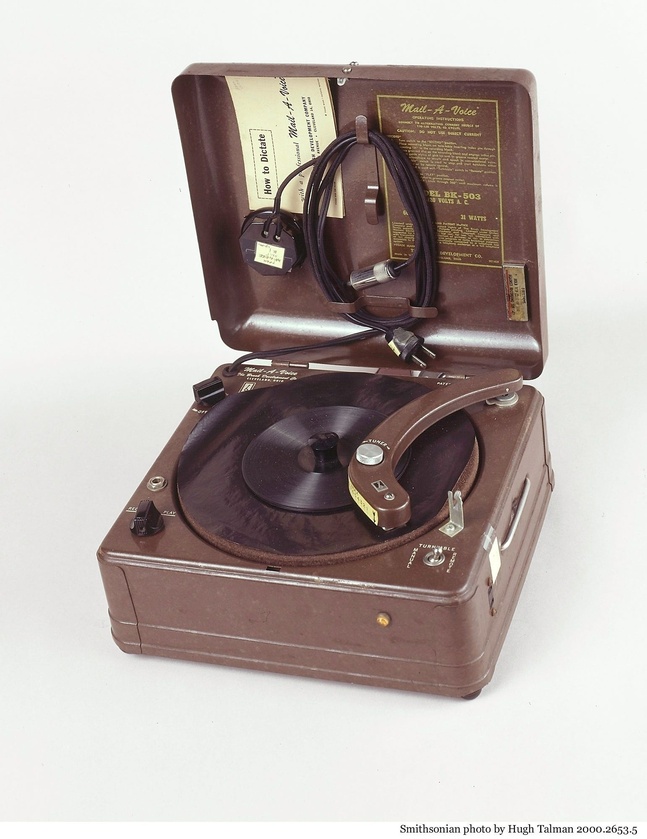
The Mail-a-Voice.  Be Honest.  You want one.

A truly fascinating device, the Mail-a-Voice looked like a phonograph… except it used a paper disc that was coated in magnetic material. You could then record up to 3 minutes of audio on a single paper disk (which would spin at 20 rotations per minute)… and then fold the paper disc up and mail it to someone inside a standard envelope.

Thus the “Mail-a-Voice”.

This device didn’t store computer data itself -- it was only for audio -- but it did inspire engineers who were working on cheap data storage for computers…

February, 1948 - Andrew Booth’s Spinning Drum

In a 1947 trip to the USA, Andrew Booth (who was working on his own computer design), had the chance to see the “Mail-a-Voice” in action.

Since Booth needed a good, inexpensive storage medium for his computer… he attempted to build a similar device using a flat, paper, magnetic disk. What was, essentially, a first attempt at what we would now call a “Floppy Disk”.

Unfortunately, it didn’t quite work. Booth found that he needed to spin the paper disk quite a bit faster in order to make it viable as a data storage mechanism… and he had a hard time keeping the paper disk flat.

In fact, as Booth upped the RPM to 3,000 — which is what he determined he needed — the paper disk itself started to disintegrate. Booth would later comment:

“I suppose I really invented the floppy disc, it was a real flop!”

So he abandoned that approach and, instead, decided to use a brass drum. Why brass? Because brass is a bit less likely to disintegrate than… paper.
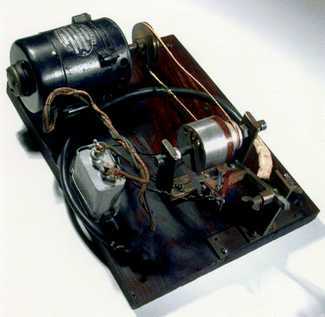
It's brass, baby!  BRASS!

This system worked. His brass, rotating drum (with a magnetic coating), had a 2 inch diameter and could store 10 bits per inch.

Yeah. 10 bits. Per inch.

Not exactly massive amounts of storage. But, hey, it was a start! And it didn’t disintegrate! Huzzah!

Improving the magnetic drum

With the first prototype working, Booth set about improving his magnetic, rotating drum storage device. The final version ended up being able to store 256 words of either 20 or 21 bits each (different sources cite different values here and there does not appear to be consensus on if it was 20 or 21 bit words).

In modern terms: This would be equivalent to roughly 5 kilobits of data storage.  Give or take.

This storage drum was put to use on the ARC (the Automatic Relay Computer).
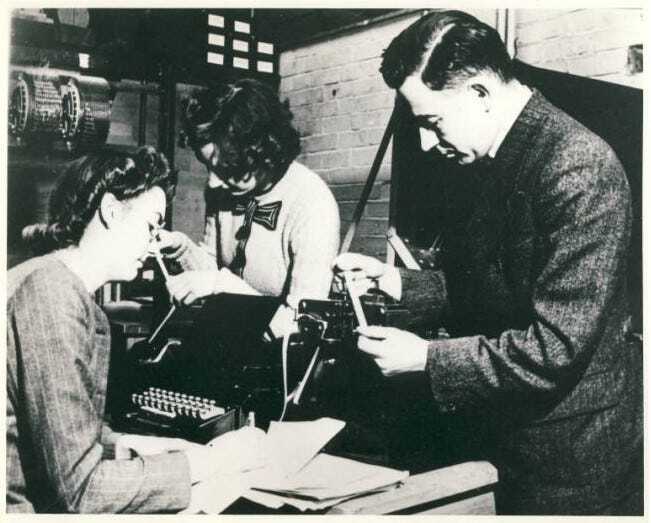
Booth working on the Automatic Relay Computer.

When all was said and done, the ARC could utilize that storage drum to handle 50 numbers and could load a program consisting of 300 individual instructions.

It wasn't exactly a “Hard Disk Drive”… more of a “Hard Drum Drive”.

Either way… Pretty darn cool for the 1940s.

1956 - The First “Hard Disk Drive”

Over the years that followed, this idea was refined and improved. The rotating drum was abandoned for hard, magnetic platters — ones sturdy enough to handle much higher RPMs (certainly much sturdier than paper!)... and thus leading to faster data access.

These improvements eventually leading to the 1956 release of the IBM Model 350 Disk Storage Unit for the IBM 305 RAMAC computer.
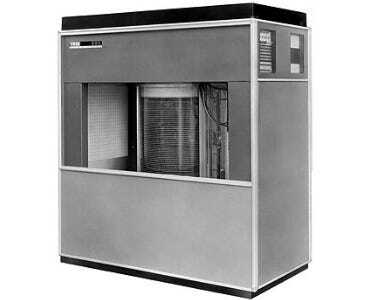
IBM Model 350 Disk Storage Unit

The Model 350 Hard Disk Drive, in a base configuration, could store roughly 3.75 MB — all contained in a cabinet 5 feet long, 2 1/2 feet deep, and 5 1/2 feet tall — with platters spinning at 1,200 RPM.

And all thanks to a voice dictation device built for mailing 3 minutes of audio on a folded-up piece of paper.


community logo
Join the Lunduke Community
To read more articles like this, sign up and join my community today
8
What else you may like…
Videos
Podcasts
Posts
Articles
Operating System Age Verification Bill Signed Into Law in Illinois

HB-5511, which will require Age data collection on all Operating Systems (including Linux, FreeBSD, and others), was signed by Governor Pritzker.

More from The Lunduke Journal:
https://lunduke.com/

00:20:26
Woke Politics Control Open Source

Not user needs. Not technical requirements. Engineering decisions are now made by woke politics. This is not surprising, as Open Source orgs shift from software to political activism.

More from The Lunduke Journal:
https://lunduke.com/

00:30:06
Linux Hits 10% Market Share?!

According to Statcounter, Desktop Linux is at 10.65% market share in North America. Cloudflare numbers are similar. But Steam disagrees.

More from The Lunduke Journal:
https://lunduke.com/

00:11:46
November 22, 2023
The futility of Ad-Blockers

Ads are filling the entirety of the Web -- websites, podcasts, YouTube videos, etc. -- at an increasing rate. Prices for those ad placements are plummeting. Consumers are desperate to use ad-blockers to make the web palatable. Google (and others) are desperate to break and block ad-blockers. All of which results in... more ads and lower pay for creators.

It's a fascinatingly annoying cycle. And there's only one viable way out of it.

Looking for the Podcast RSS feed or other links? Check here:
https://lunduke.locals.com/post/4619051/lunduke-journal-link-central-tm

Give the gift of The Lunduke Journal:
https://lunduke.locals.com/post/4898317/give-the-gift-of-the-lunduke-journal

The futility of Ad-Blockers
November 21, 2023
openSUSE says "No Lunduke allowed!"

Those in power with openSUSE make it clear they will not allow me anywhere near anything related to the openSUSE project. Ever. For any reason.

Well, that settles that, then! Guess I won't be contributing to openSUSE! 🤣

Looking for the Podcast RSS feed or other links?
https://lunduke.locals.com/post/4619051/lunduke-journal-link-central-tm

Give the gift of The Lunduke Journal:
https://lunduke.locals.com/post/4898317/give-the-gift-of-the-lunduke-journal

openSUSE says "No Lunduke allowed!"
September 13, 2023
"Andreas Kling creator of Serenity OS & Ladybird Web Browser" - Lunduke’s Big Tech Show - September 13th, 2023 - Ep 044

This episode is free for all to enjoy and share.

Be sure to subscribe here at Lunduke.Locals.com to get all shows & articles (including interviews with other amazing nerds).

"Andreas Kling creator of Serenity OS & Ladybird Web Browser" - Lunduke’s Big Tech Show - September 13th, 2023 - Ep 044
2 hours ago

How the ‘Nostradamus of AI’ Got It Wrong - The Journal. - WSJ Podcasts
https://www.wsj.com/podcasts/the-journal/how-the-nostradamus-of-ai-got-it-wrong/2f2bbadb-e992-4680-a89c-919f7647cfda

The "Smartest Guys in the Room", 2026 edition. And it's just the beginning.

6 hours ago

Say it isn't so!!

August 04, 2026

Lee’s Move to Linux Full Time

Psyche, not giving up my Mac laptops, but since I’m doing so much work on my AI Employee Factory and all I’m building runs on my Linux machine, I’m reversing my “I bought a M5 Mac Air with 32Gig ram to be my main dev machine”. I am creating AI Employees that have jobs and run all day and night from my Linux box. Hella cool. More on those over time.

Too late, I already bought the Mac. But my M2 Air would have been sufficient.

I started with Syncthing and set the M4 Mac mini has my hub, and 2 laptops, a windows machine and my linux box to sync my /projects dir back and forth to the hub. It worked when I wasn’t hard core developing and running on the Linux box. It was nice to pick up any of my machines and work on any project. But I started throwing consistent Syncthing errors.

Then I started ssh’ing into Linux and running claude code and code via command line. Which works nicely, but if I close my laptop, long running processes end.

I added Zellij (a...

Lunduke Lifetime Discount Ends in 1 Day; Zelda, Larry, SQ, & Keen Walls Available

TL;DR: Lifetime Subscription discount ends in one day. There are currently 4 “Lifetime Walls” with space available for more names (the Oregon Trail Wall is now full).

We’ve been running a massive discount on Lunduke Journal Lifetime Subscriptions for the entire months of June and July. And it has been an absolute blast. There are now 21 (twenty-one!) retro computer walls overflowing with your names.

Pure insanity. Huge thank you to everyone who has supported The Lunduke Journal.

But the discounted price only runs through July 31st… and that moment is just about here.

When the calendar ticks over into August (just a hair over 24 hours from now), the Lunduke Journal Lifetime Subscription price goes back to normal.

  • If the calendar still says it’s July, the Lifetime price is still discounted to $125.

  • If the calendar says August… the price returns to $300.

There are, as of this exact moment, 4 retro game themed “Lifetime Walls” which still have some space for more names (check Lunduke.com for the full list):

  1. Legend of Zelda

  2. Commander Keen 4

  3. Space Quest 4

  4. Leisure Suit Larry

Grab a discounted Lifetime Subscription (scroll down for the details), then email Lunduke (bryan at lunduke.com) with which Wall you’d like to appear on.


First come, first served. Once a Wall is full, it’s full. So if there’s a specific Wall you’d like to be on, don’t dilly dally.

How to Grab a Discounted Lifetime Subscription:

There are 3 different ways to pick up a Lunduke Journal Lifetime sub. All of them work great. Choose whichever works best for you!

Remember: These discounted prices go back up to normal ($300) on August 1st.

Get a Lifetime Subscription via Locals:

  1. Go to Lunduke.Locals.com/support.

  2. Select “Give Once“.

  3. Enter “125“ into the amount field.

  4. After checking out, Lunduke will toss you an email once your account is set to full lifetime status. (This usually happens within a few hours.)

Get a Lifetime Subscription via Substack:

  1. Go to Lunduke.Substack.com/subscribe.

  2. Select the “Lifetime Subscription” option.

  3. After checking out, Lunduke will toss you an email once your account is set to full lifetime status. (This usually happens within a few hours.)

If you would also like full, Lifetime access to Lunduke.Locals.com (which is included):

  1. Make a free account on Lunduke.Locals.com.

  2. Email “bryan at lunduke.com” with the email address you use on both Substack and Locals (can be different email addresses).

  3. Lunduke will toss you an email once your account is set to full lifetime status on Locals.

Get a Lifetime Subscription with Bitcoin:

Bonus: Save an extra $10 with the Bitcoin option, as Bitcoin processing has fewer fees associated with it.

bc1qyjakve8fywm8pz2v99v57yhjj0vzr2vjze6fcq

  • Email “bryan at lunduke.com” with the following information: What time you made the transaction, how much was sent (in Bitcoin), and the email address you use (or plan to use) on Locals.com or Substack.com.

-Lunduke

Read full Article
post photo preview
Oregon Trail, Keen, & Leisure Suit Larry Lifetime Walls

Holy frijoles! There are now 20 (twenty!) Lifetime Subscriber Walls, filled with the names of roughly one bazillion Lunduke Journal supporters.

Just amazing.

Two super quick updates:

  1. The “Desqview/X”, “NeXTSetp”, & “TRS-80 Model 100” Walls are now full! (Check them out on Lunduke.com and at the end of new shows.)

  2. There are 3 new Walls available to put your John Hancock on… and, just for kicks, these ones aren’t from Classic Operating Systems… they’re Classic Games:

    1. Oregon Trail

    2. Commander Keen 4

    3. Leisure Suit Larry


I don’t expect space on these Walls to last long. First come first served.

A huge thank you to all of The Lunduke Journal subscribers. Your support is deeply appreciated. You make this possible.

-Lunduke

Read full Article
post photo preview
TRS-80 Model 100 joins The Lunduke Journal Lifetime Wall party!

Buckle up, Buttercup. Because The Lunduke Journal is about to blow your mind.

  1. The “BeOS” Wall Lifetime Subscriber Wall is now full (see all of them on Lunduke.com)!

  2. We’ve added a new “TRS-80 Model 100” Wall (because we can)! That’s the 19th Lifetime Subscriber Wall! 19!

  3. The discounted Lifetime Lunduke Journal Subscriptions are still available through to the end of this month (July).

Which means there are, as of this exact moment, 4 Walls with space available (see Lunduke.com for the full list of Walls). But these fill up wicked fast.

  1. Emacs (only a few spots left)

  2. Desqview/X (a little less than 2/3rd’s full)

  3. NeXTStep (still plenty of space)

  4. TRS-80 Model 100 (just launched)


Nice, right?

Worth noting: The “TRS-80 Model 100” has very limited screen resolution (240 x 64), which means only a small number of names can fit on that wall. If you want on it, I’d let me know right away.

Grab a discounted Lifetime Subscription (if you don’t already have one), then let me know (email “bryan at lunduke.com”) which Wall you’d like to see your name on.

Huge high five to everyone who has already added their name to a Wall. At the current rate, we’ll have over 20 retro computer themed walls, filled with all of your names, by the end of the month.

And, doggone it, that’s amazing.

-Lunduke

Read full Article
See More
Available on mobile and TV devices
google store google store app store app store
google store google store app tv store app tv store amazon store amazon store roku store roku store
Powered by Locals