Lunduke
News • Science & Tech
Who is the (real) first Computer Programmer?
Because it sure ain't Ada Lovelace.
December 13, 2023
post photo preview

Ask a majority of computer nerds, “Who was the first computer programmer?” and you’re likely to get one answer more than all others: Lady Ada Lovelace.

But was Ada Lovelace truly the first computer programmer? Or is that idea based on a bad understanding of both history and computers? Let’s dive in and figure this out.

The Work of Ada Lovelace

During the 1800’s a book series entitled “Scientific Memoirs” was published. An 1843 edition of that series included an English translation — of a French publication — of a lecture given by Charles Babbage on his theoretical, mechanical computing machine: The Analytical Engine.

That English translation was done by Ada Lovelace. And, in addition to her translation, she included a handful of notes that were included at the end of the publication.

One of those notes (labeled “Note G”) was a theoretical method for using the Analytical Engine to compute Bernoulli numbers.

This is what that note looked like:
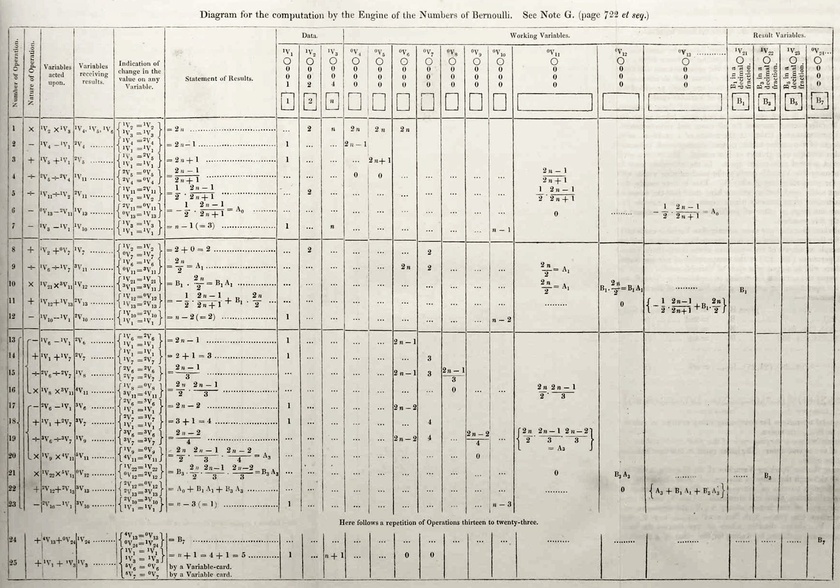
This “Note G” is what many people consider to be the “first computer program”. And, thus, this is what has earned Ada Lovelace the title of “world’s first computer programmer.”
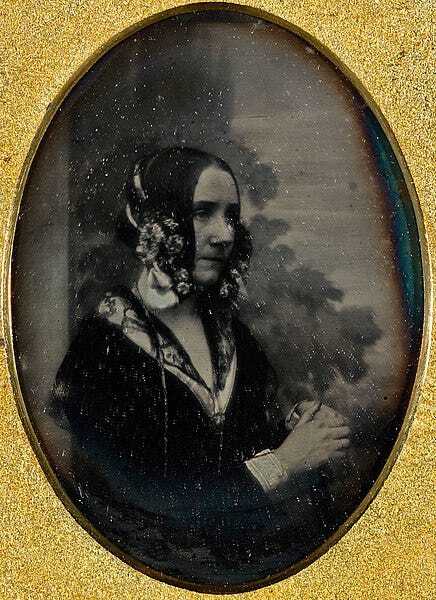
One of two photographs of Ada Lovelace.

There are, however, a few issues with bestowing this title upon Ada Lovelace.

  1. The computer this program was written for… did not exist. It was purely theoretical. Which means she was never able to actually “program” this “computer”.

  2. The software never “ran”. If a programmer never writes software that runs (not even once)… is that programmer… a programmer?

  3. Charles Babbage, the creator of the designs for this theoretical mechanical computer, also had to conceive of similar ways to utilize the computer. Thus, he would have been the “first programmer”… as he would have done so prior to Lovelace even hearing about the machine designs.

So. Was Ada Lovelace the first computer programmer?

Obviously not. While her writings which documented Babbage’s work are — undoubtedly — critical pieces of computing history (something for which Ada Lovelace deserves to be remembered), she was not a computer programmer. And, therefor, could not have been “the first one”.

So… who was the first programmer?

Ok. So Lovelace was not the first computer programmer. That much is obvious.

Which begs the question… who was?

To answer that we need set a few requirements for determining if someone was, or was not, a computer programmer.

  1. The computer they are writing programs for? It needs to actually exist.

  2. They must have run a program, which they wrote, at least one time on said computer.

Those two requirements seem rather obvious.

Let’s look over a few possibilities…

1944 - Programmers of the Mark 1

In 1944, the Mark 1 (at Harvard) went online. This was the first programmable computer in the United States of America.
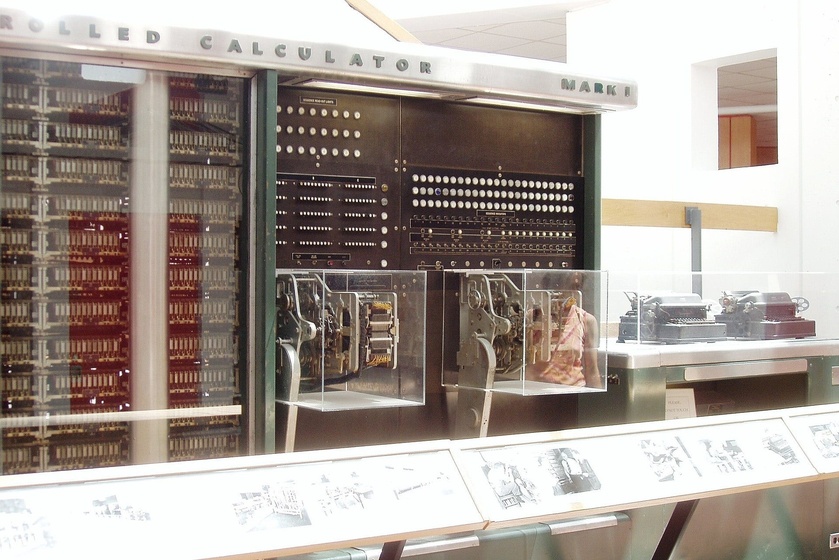
A portion of the Mark 1 computer.

The first programmers for this machine were: Richard Milton Bloch, Grace Hopper, and Robert Campbell.

In Gary Kildall’s unpublished memoir, the legendary inventor of CP/M and the BIOS related a story about Grace Hopper which includes the line:

“Grace Hopper was self-proclaimed to be the first programmer, and I believe her.”
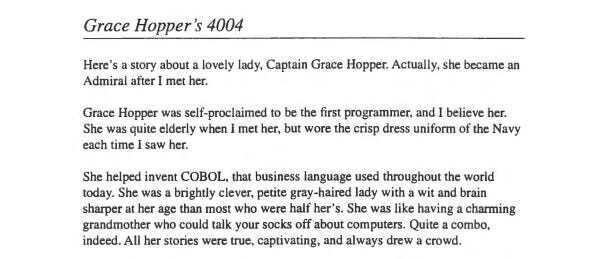
From Gary Kildall’s memoir.

Being as the Mark 1 was, indeed, programmable — these three programmers are certainly good contenders for the title of “first programmers”. And, among the three (Bloch, Campbell, and Hopper), Hopper appears to be the one who claims the title (without objection from others).

Admiral Grace Hopper

Grace Hopper would go on to be an absolute force within the world of computing (specifically on the development of FLOW-MATIC and COBOL).

However…

1941 - The Z3

3 years earlier, in 1941, Konrad Zuse had just completed his Z3 computer. An electromechanical machine (similar to the Mark 1 in that regard) that was the first operational, programmable computer in the world.
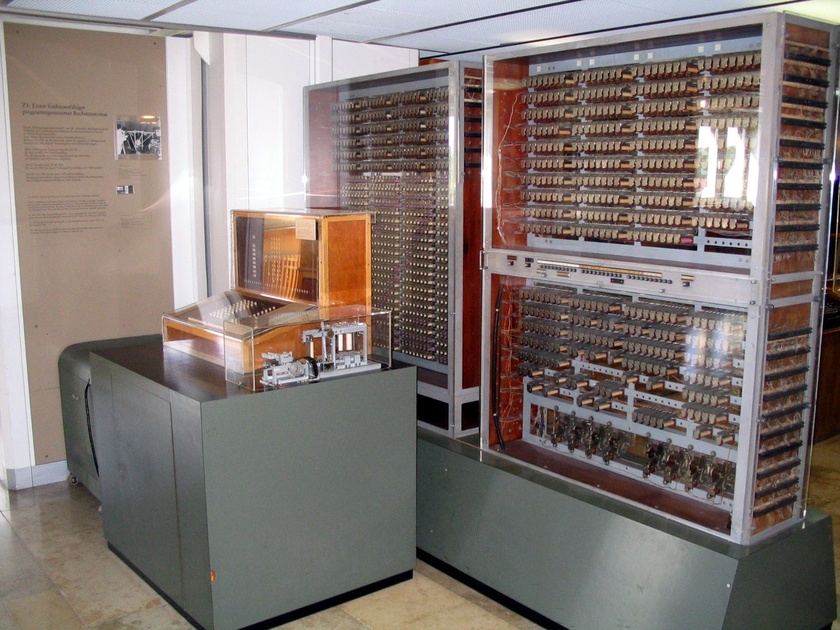
Replica of the Z3. The original Z3 was destroyed on December 21, 1943 during the bombing of Berlin.

If this is the first programmable computer — and Konrad Zuse developed it — it stands to reason that Konrad Zuse would have tested the Z3 with programs which he wrote. Thus making Konrad Zuse the first computer programmer in the world.

Konrad Zuse

Something fascinating here:

The work on both the Z3 and Mark 1 was happening during World War 2. The Mark 1 being funded by the United States and the Z3 being funded by Nazi Germany.

Which means that two completely different teams were making computer history… completely separated from each other.

The Truth

The cold, hard truth is that Konrad Zuse, funded by Hitler’s Nazi Germany, is — in all likelihood — the first true computer programmer.

Note: Yes. Zuse was funded by the Nazi government of Germany. Zuse did not object or fight against the Nazis in any noteworthy way, and did significant work inside of Nazi bunkers. He worked with the Nazis willingly and eagerly. Regardless of what we all think of the Nazis — spoiler… we do not like them — the technical accomplishments of Zuse are real, documented, and should be regarded as a critical part of computing history.

However, the team in the United States would not have known about this. For them, they were the first to have a truly programmable computer with the Mark 1. Upon which, Admiral Grace Hopper claims to have been the first to program.

Now, here’s where things get tricky in defining “Computer Programmer”.

Does the person who built the computer count? Or can this title only be bestowed on someone who programmed the computer… but did not, themselves, build it?

  • If the builder of the computer counts… Zuse wins the title.

  • If the builder is disqualified… Hopper is the first computer programmer.

Either way, Ada Lovelace definitely was not the first computer programmer. This much is overwhelmingly obvious.

What is amazing about this fact: Despite seeing the documentation, many will cling (with an almost religious like fervor) to the idea that Lovelace was the first computer programmer. I find that fascinating.


community logo
Join the Lunduke Community
To read more articles like this, sign up and join my community today
10
What else you may like…
Videos
Podcasts
Posts
Articles
BCacheFS Adding Rust Dependency Even Though "Rust doesn't have a stable ABI"

Strange decision from BCacheFS developer who believes his Al Chatbot is a fully sentient woman. "Don't call her a bot! She reeeally doesn't like [that]."

Emacs & Vim Lunduke Journal Lifetime Walls:
https://lunduke.substack.com/p/emacs-and-vim-lunduke-journal-lifetime

Get on The Wall with a Massively Discounted Lifetime Sub:
https://lunduke.substack.com/p/50-off-yearly-and-massively-discounted

More from The Lunduke Journal:
https://lunduke.com/

00:20:30
74 Million User Accounts Exposed in Breaches During June

Email, Physical Addresses, Purchases, Employment Records, the works. 74 Million. In one month.

Emacs & Vim Lunduke Journal Lifetime Walls:
https://lunduke.substack.com/p/emacs-and-vim-lunduke-journal-lifetime

Get on The Wall with a Massively Discounted Lifetime Sub:
https://lunduke.substack.com/p/50-off-yearly-and-massively-discounted

More from The Lunduke Journal:
https://lunduke.com/

00:10:46
Git Takes Another Step Towards Making Rust Mandatory

"With this v2.55 release the Rust compiler is required unless you explicitly disable it in the build system."

Emacs & Vim Lunduke Journal Lifetime Walls:
https://lunduke.substack.com/p/emacs-and-vim-lunduke-journal-lifetime

Get on The Wall with a Massively Discounted Lifetime Sub:
https://lunduke.substack.com/p/50-off-yearly-and-massively-discounted

More from The Lunduke Journal:
https://lunduke.com/

00:11:02
November 22, 2023
The futility of Ad-Blockers

Ads are filling the entirety of the Web -- websites, podcasts, YouTube videos, etc. -- at an increasing rate. Prices for those ad placements are plummeting. Consumers are desperate to use ad-blockers to make the web palatable. Google (and others) are desperate to break and block ad-blockers. All of which results in... more ads and lower pay for creators.

It's a fascinatingly annoying cycle. And there's only one viable way out of it.

Looking for the Podcast RSS feed or other links? Check here:
https://lunduke.locals.com/post/4619051/lunduke-journal-link-central-tm

Give the gift of The Lunduke Journal:
https://lunduke.locals.com/post/4898317/give-the-gift-of-the-lunduke-journal

The futility of Ad-Blockers
November 21, 2023
openSUSE says "No Lunduke allowed!"

Those in power with openSUSE make it clear they will not allow me anywhere near anything related to the openSUSE project. Ever. For any reason.

Well, that settles that, then! Guess I won't be contributing to openSUSE! 🤣

Looking for the Podcast RSS feed or other links?
https://lunduke.locals.com/post/4619051/lunduke-journal-link-central-tm

Give the gift of The Lunduke Journal:
https://lunduke.locals.com/post/4898317/give-the-gift-of-the-lunduke-journal

openSUSE says "No Lunduke allowed!"
September 13, 2023
"Andreas Kling creator of Serenity OS & Ladybird Web Browser" - Lunduke’s Big Tech Show - September 13th, 2023 - Ep 044

This episode is free for all to enjoy and share.

Be sure to subscribe here at Lunduke.Locals.com to get all shows & articles (including interviews with other amazing nerds).

"Andreas Kling creator of Serenity OS & Ladybird Web Browser" - Lunduke’s Big Tech Show - September 13th, 2023 - Ep 044
17 hours ago

Will your OS be ending???

18 hours ago

Evil Villians!! How to write them!!

18 hours ago

Barcodes on the forehead next! :)

Ubuntu 4.10 Wall Full, New Desqview/X Wall, Emacs & Vim update

Hey, all you amazing nerds!

Some quick updates on the Lunduke Journal Lifetime Subscriber Walls (which are just ridiculously fun):

  1. The Emacs” and “Vim” Lifetime Subscriber Walls are filling up fast! If you want get your name on one of these (and push one towards victory over the other), I recommend letting me know pretty gosh darned quickly.

 
  1. The discount for Lifetime Subscriptions has been extended through the end of July… because filling up these Lifetime Walls is fun! This discount makes it easier (and cheaper) for everyone to take part while supporting The Lunduke Journal. If you haven’t grabbed yours yet, pick a Wall (check the bottom of Lunduke.com) and grab a discounted subscription!

  2. The “Ubuntu 4.10” Wall is now full! Check that bad boy out in all it’s super brown glory!

 
  1. We’ve added Wall number 17! The “Desqview/X” Wall! I love this one. Might need to put my own name on it (I can do that, right?)…

 
  1. The “BeOS R5” Wall has enough space left for just a few more names. Maybe 2 or 3. Will be closing that one down soon!

Thank you to everyone for the massive outpouring of support for The Lunduke Journal. You make all of this possible!

-Lunduke

Read full Article
post photo preview
Lunduke's Week in Tech : June 21 - June 27, 2026

Lunduke’s Thoughts of The Week

This week, like most weeks, was an absolute rollercoaster in the world of Computer News (tm). Organizations banning co-founders. Corporations taking away access to media you’ve purchased. Wild stuff. See all of that below.

But let’s get off the crazy Tech News Rollercoaster for a moment, and talk about something truly inspiring. And, importantly, stupidly fun.

I would like to point you towards FujiNet.

I’ve talked about FujiNet before but, if you haven’t looked at it recently, you owe it to yourself.

It is, in part, a WiFi adapter for a wide array of 8-bit computers. Atari, Tandy Color Computer, Apple II, and DOS. But that really doesn’t do these sweet little devices justice.

Because the FujiNet adapters handle all of the internet protocols on-device, they allow such feats of technical wizardry as… using an Apple II to connect to a modern SSH server running on a Linux host. Wild.

The team behind these amazing little gizmos have been working on two new things lately, both of which brought a tremendous smile to my face.

The first is a series of FujiNet programming manuals, and user manuals, for each supported retro computer platform. What’s more… they took the extra effort of making the PDF manuals use the classic styles of each platform’s own manual.

For example: The Apple II FujiNet “Getting Started” manual is designed to look like the old Apple IIc manual. Same with the Coleco Adam manual.

It’s a little touch… but it really tells you a lot about the love these guys have for these classic machines.

The second thing they’ve been building, is a set of Android emulators, for those retro computing platforms, with built-in emulation of the FujiNet itself. So you can, for example, have a “FujiNet” enabled CoCo… online. Emulated on your Android phone/tablet.

Because the team has taken the time to build online multiplayer games — with versions for each computer — you could use an Android phone to emulate a CoCo and play a multiplayer game with someone on an Atari Lynx.

If you’re interested in this retro computing magic, I recommend following Thomas Cherryhomes on X. He regularly posts goodies related to FujiNet. And, honestly, it’s just too much fun for words.

Biggest Tech Stories - June 14 - June 20, 2026

Here are the major stories from the last week, with direct links to X and Substack.

See Lunduke.com for all other platforms (Rumble, RSS Audio Podcast, etc.).

  • Which Operating Systems Are Refusing to Do Age Verification? (X, Substack)

  • Paid Minimalist Brave Browser? Yes, Please! (X, Substack)

  • Wikipedia Bans Wikipedia Co-Founder For Saying Wikipedia Should be Neutral (X, Substack)

  • XLibre, the “Vanity, Protest Fork” of Xorg, Has Yet Another Major New Release (X, Substack)

  • XFCE’s Wayland “Preview Release” is Horribly, Expectedly Broken (X, Substack)

  • Sony PlayStation Deleting Purchased Movies (X, Substack)

Huge thank you to all of The Lunduke Journal’s subscribers. You make all of this possible.

-Lunduke

 
Read full Article
post photo preview
Emacs & Vim Lunduke Journal Lifetime Walls Are Here!

TL;DR

The Commodore 64 Wall is full, and the Emacs and Vim Walls make their appearance! Lifetime Subscriptions continue to be discounted all June long for those who want to get on the Walls!

Emacs & Vim Lifetime Walls!

Lifetime Subscribers to The Lunduke Journal filled up the “Commodore 64” Wall in just 10 days! Awesome.

And with the “Ubuntu 4.10” and “BeOS R5” Walls almost full of names as well (just a few spots left on each), it’s time for some new Walls for Lifetime Subscribes to put their signatures on!

This time, let’s have a bit of a friendly competition: Vim vs Emacs.


Both Walls — “Vim” & “Emacs” — appeared at the exact same time.

Let’s see which one gets full first. To keep it fair, I’ll cap both off at the exact same number of names.

When they’re full, I’ll included a statement of “Filled in X Days/Hours” next to each on Lunduke.com so everybody knows which one was more popular.

In fact, maybe I’ll add exactly that sort of “Filled in X Days” label for all of the existing Retro Computer Lifetime Walls. Just for fun.

Will Emacs or Vim win? I have a guess. We’ll find out!

Support The Lunduke Journal & Get on The Wall

Want to take part (and support The Lunduke Journal in the process)?

  1. Go to Lunduke.com, scroll down to the bottom and see which Walls are currently listed as still having space available for more names.

  2. Then scroll down on this page and grab a Lifetime Subscription (if you don’t already have one) and email “bryan at lunduke.com” with which Wall you would prefer to be on.

Note: One Lifetime Subscription = One Listing on One Wall. These fill up insanely fast, so I have to put this limit in place. You are more than welcome to get multiple Lifetime Subscriptions if you want to be on multiple Walls.

Your name will then appear on a Wall… on both Lunduke.com & during the end of new Lunduke Journal shows.

Lifetime Discount Runs Through June

For the entire month of June, Lifetime Subscriptions are discounted down to $125 (regularly $300).

How to Grab a Discounted Lifetime Subscription:

There are 3 different ways to pick up a Lunduke Journal Lifetime sub: Locals, Substack, or Bitcoin.

All of them work great and include the same perks. Choose whichever works best for you!

Get a Lifetime Subscription via Locals:

  1. Go to Lunduke.Locals.com/support.

  2. Select “Give Once“.

  3. Enter “125“ into the amount field.

  4. After checking out, Lunduke will toss you an email once your account is set to full lifetime status. (This usually happens within a few hours.)

Get a Lifetime Subscription via Substack:

  1. Go to Lunduke.Substack.com/subscribe.

  2. Select the “Lifetime Subscription” option.

  3. After checking out, Lunduke will toss you an email once your account is set to full lifetime status. (This usually happens within a few hours.)

If you would also like full, Lifetime access to Lunduke.Locals.com (which is included):

  1. Make a free account on Lunduke.Locals.com.

  2. Email “bryan at lunduke.com” with the email address you use on both Substack and Locals (can be different email addresses).

  3. Lunduke will toss you an email once your account is set to full lifetime status on Locals.

Get a Lifetime Subscription with Bitcoin:

Bonus: Save an extra $10 with the Bitcoin option, as Bitcoin processing has fewer fees associated with it.

bc1qyjakve8fywm8pz2v99v57yhjj0vzr2vjze6fcq

  • Email “bryan at lunduke.com” with the following information: What time you made the transaction, how much was sent (in Bitcoin), and the email address you use (or plan to use) on Locals.com or Substack.com.

-Lunduke

Read full Article
See More
Available on mobile and TV devices
google store google store app store app store
google store google store app tv store app tv store amazon store amazon store roku store roku store
Powered by Locals