Lunduke
News • Science & Tech
The Apple Vision Pro: designed to make you less happy
Creepy. Dystopian. And more than a little like a drug dealer.
June 06, 2023
post photo preview

The Apple Vision Pro is a truly remarkable feat of engineering.  Both the hardware and software of this, undeniably, revolutionary device are nothing short of phenomenal.  I stand in awe of the technical wizardry on display by the team at Apple.

That said.

It is crystal clear that the Apple Vision Pro will make those who use it less happy.

And this is not a bug.  This is not a flaw that needs to be ironed out.  The fact that the Apple Vision Pro will make people sad is core to the very design of the device itself.

The fact that Apple will benefit from the sadness of its users, suggests -- rather strongly -- that this is not an accident.

Allow me to explain.

Apple Vision Pro takes away your eyes

When you strap the Apple Vision Pro onto your face -- which Apple is encouraging you to do "all day", even while talking with other people -- no other human can see your eyes.

The eyes are a gateway to the human soul.  Not being able to see the eyes of the person you are talking to takes away a core part of the experience.

In fact, the Vision Pro doesn't simply cover up your eyes... it displays a "Deep Fake", 3D rendered representation of what your eyes might look like to the screen on the outside of the Vision Pro.

Apple-Vision-Pro-Eyes.jpg?w=1024

Is it creepy?

Yes.  Undeniably creepy.  Disturbingly so.

But, even more importantly, it places a barrier between you and whoever you are talking to.  Removing one core piece of the human experience.  By design.

But Apple doesn't stop there.  No, sir.  That is only the beginning.

Apple removes YOU from video calls

The world of video conferencing has exploded over the last few years.  For better or worse, many of us make an awful lot of video calls -- for both work and personal reasons.

And, while these video calls may not be as personal as being, you know, actually in front of another person... they still have the benefit of showing real video of the person you are talking to.  You can see their eyes.  Their facial experessions.  You can see what they really look like.

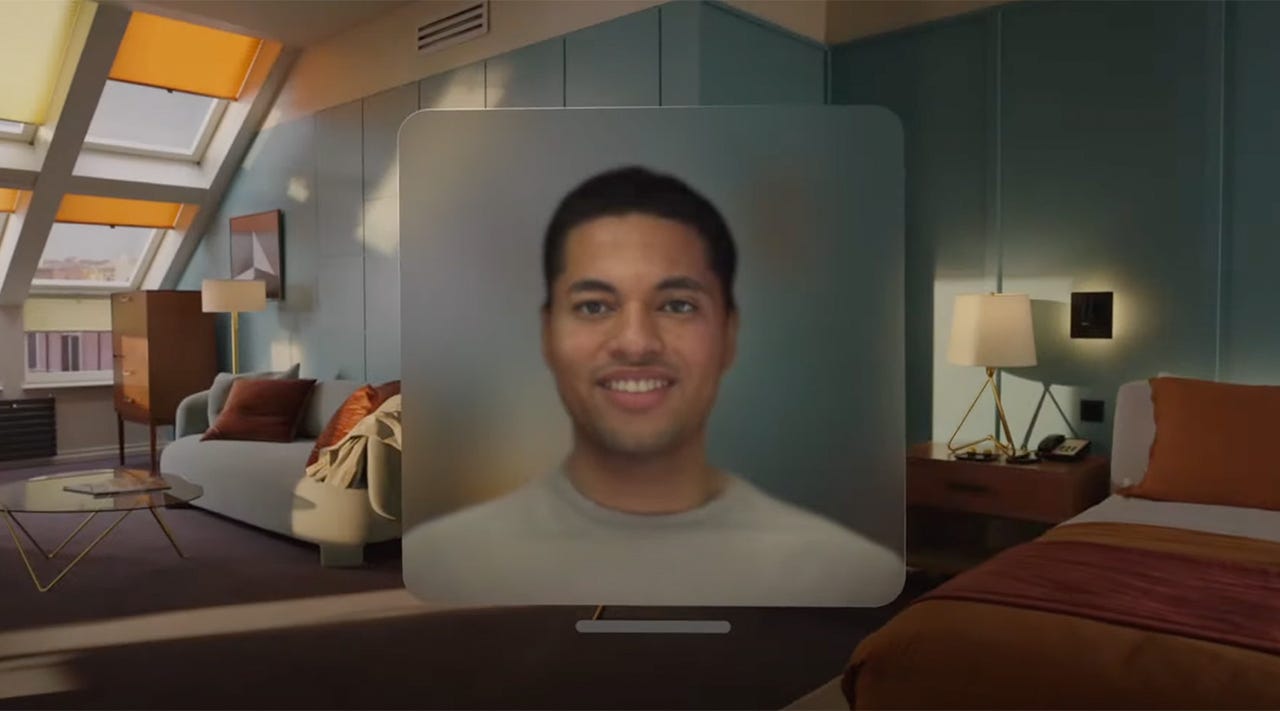
A core feature of the Apple Vision Pro is to remove that video of you... and replace it with a 3D rendered Deep Fake of what you might look like.

Seriously.
digital-persona-header.jpg?auto=webp&width=1280

Your face is covered by the Vision Pro, no video camera is there to capture your true face.  So what does Apple send to those you are on a video call with?  A terribly creepy -- and absolutely not real -- rendering of "you".

If you are on a video conference call with 3 other people -- and each of you is using the Vision Pro -- you now have 4 people... looking at not real, Deep Fakes of each other.  Placing yet another barrier between you and all other humans.

Apple Vision Pro is designed to isolate you

You'll note that, in all of the features of the Vision Pro, Apple is providing functionality that is not entirely new.  These are not new things we can do because of the Vision Pro... merely new ways of doing the things we already have been doing for our entire lives.

Case in point: Watching a movie.
apple-vision-pro-wwdc-2023-10.png?p=1

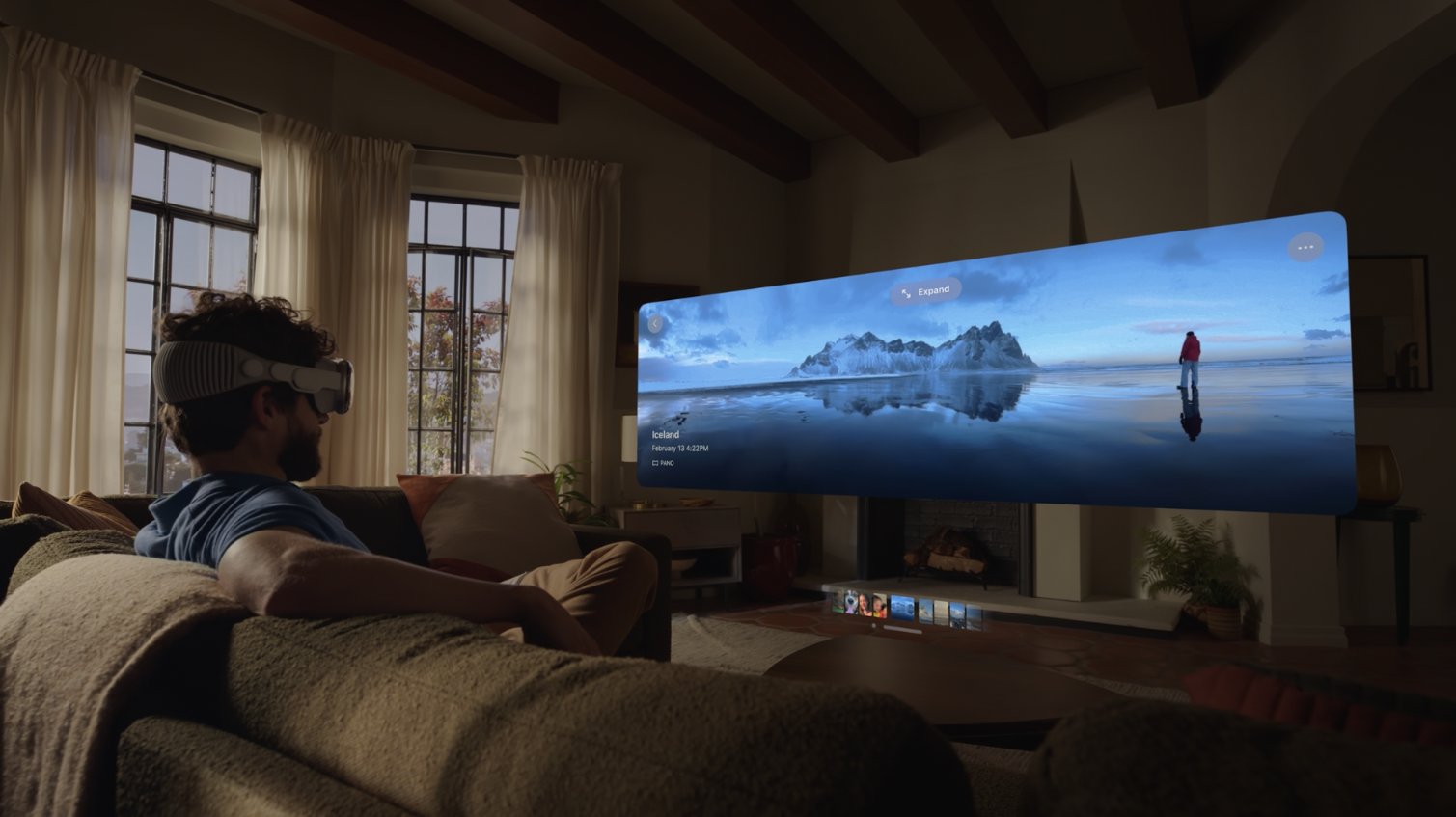
Putting a movie on a big screen TV, sitting on the couch, and enjoying a bowl of popcorn with your family.  Or your date.  Or your friends.

That is a core experience of modern humanity.  One which allows us to be together, to share experiences with those we love, and -- importantly -- truly be there.

But watching a movie in the Vision Pro -- which, according to Apple, was designed for exactly this usage -- means that, when you glance over at your date, you can't see her eyes.  Nor can she see yours.

Everyone wearing the Vision Pro is in their own world.  Isolated.  Alone.

Apple provided, during their grand announcement of the Vision Pro, a number of other examples for how they expect you to utilise this ground breaking device.

Such as: Watching your children play.

apple_vision_pro_screen_059.jpg

Instead of playing with your kids -- and, possibly, holding a camera to take pictures or record some home movies of the occasion -- you are encouraged to strap the Vision Pro over your eyes... and watch.

The recorded video, Apple says, will be truly amazing.

So, later on, you will be able to enjoy the ultra-HD, spacial, 3D-ish video of you not playing with your kids.

You will marvel at the stunning picture of that time when you could have engaged in one of the core human activities... but, luckily, Apple helped you avoid that heart-warming time with your children.

Also, when your kids look up at you, they won't see your eyes.  They will see a Deep Fake, dystopian rendering of what Daddy's eyes might look like.

Which definitely won't give your kids nightmares.

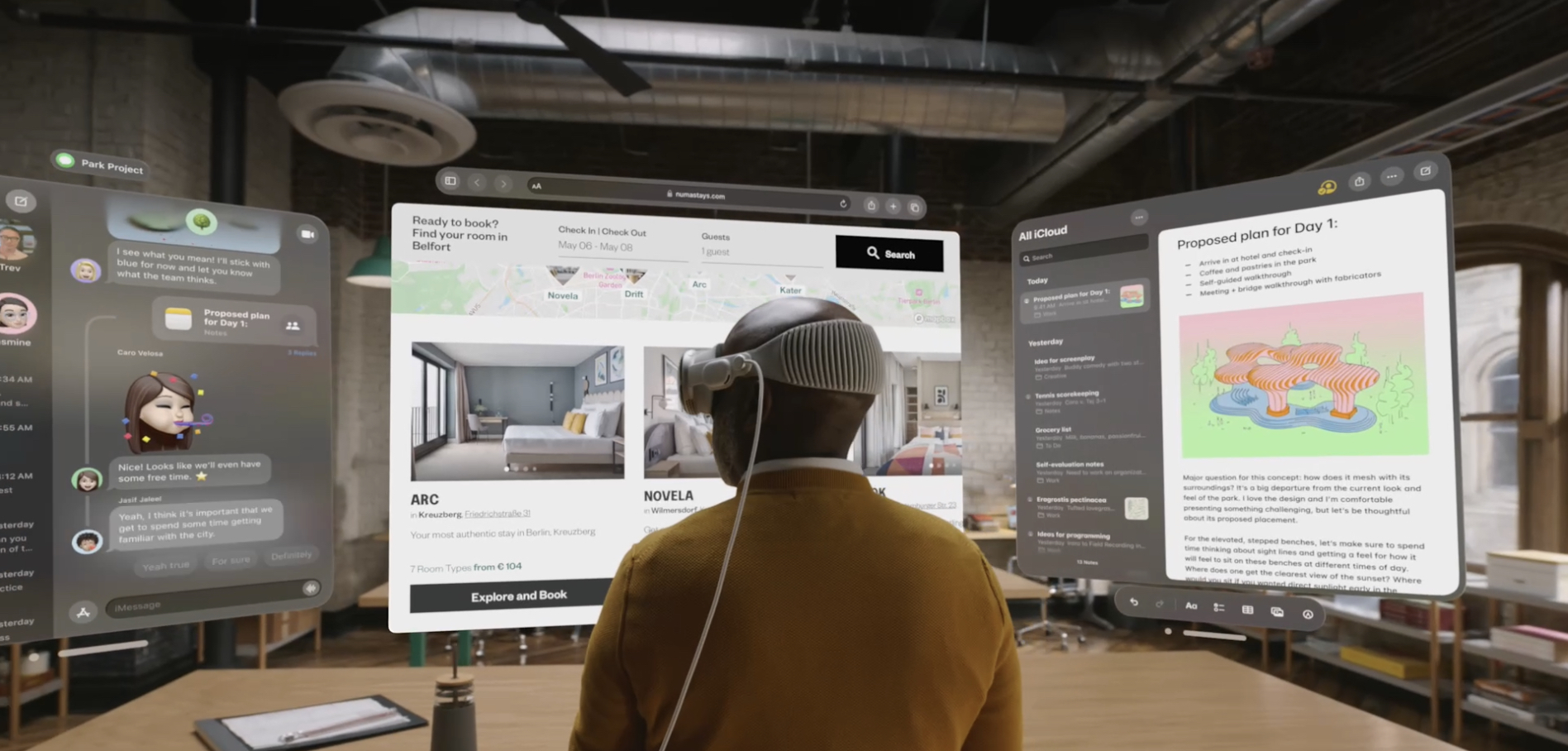
Vision Pro.  All day.  Even at work.

"But," I hear many of you saying.  "You don't need to use the Vision Pro all the time!  Just some times!"

That's not the way Apple is positioning it.

In fact, Apple repeatedly declared that their goal is to use the Vision Pro all day long.  Playing with your kids.  Watching movies.  Playing video games.  On video calls.  Walking around outside.

And even at work.
IMG_0058.jpeg

Just the same.

Even if the usage of the Vision Pro is limited to no more than 2 hours per day... that's still two hours where you are that much more cut off from all of humanity -- both those in the same room as you, and those are you on a video call with across the world.

Seeing Dad's eyes replaced with Deep Fake renderings, even for just a few hours, is already deeply disturbing.

This is some seriously dystopian future stuff here.  This is the type of technology that oh-so-many Sci-Fi stories warned us about.  Where technology -- advanced and impressive -- would cut us off from those around us.

Groups of people, sitting together, but not actually together.  Separated by the high tech wizardry strapped to their faces.

Each person, becoming increasingly sad... increasing unsatisfied with their life.  Yearning for any small hit of Dopamine they can get -- from a virtual "reward" or "trophy".  From a person sending them a digital "sticker".  From purchasing additional features, games, videos, and other consumables.

All in an endless quest to find some sense of happiness that would be found... by simply removing the device on their face.

Who benefits from this sadness?  Apple.

Make people sad, then charge them to get small doses of happiness.

This is not a new business strategy.

Facebook, Twitter, and other mass-Social Medial services have exploited exactly this model for years.  And where did they learn it?  From drug dealers.

Apple is merely the latest company to recognize the vast profits possible by making people sad, hooking them on the very source of the sadness (which will give them little doses of artificial happiness), and then charging them for it.

Subscriptions to Apple services.  Purchases on the new Apple Vision App Store.  Purchasing of additional Vision Pro's (and other Apple devices) so that those around you can "enjoy it with you".

Just like drug dealers.


Side note: I also discuss this problem in the latest episode of Lunduke's Big Tech Show.

community logo
Join the Lunduke Community
To read more articles like this, sign up and join my community today
46
What else you may like…
Videos
Podcasts
Posts
Articles
Linux Kernel Removes even MORE Hardware Support

The new requirement of TSC ("Time Stamp Counter" ), on x86 in Linux 7.2, effectively removes support for Intel 486, AMD K5's, some early Pentiums and more.

More from The Lunduke Journal:
https://lunduke.com/

00:11:00
Wolfenstein 3D for the C64

Wolf64 is a port, in pure 6502 assembly, of the 1992 FPS classic to the Commodore 64.

More from The Lunduke Journal:
https://lunduke.com/

00:06:33
Debian Votes on Banning AI

Debian Linux, now run by an anti-(cis)male Project Leader, is voting on if their project will ban Al contributions. All Debian Developers are eligible to vote. Even the Registered Sex Offenders.

More from The Lunduke Journal:
https://lunduke.com/

00:09:48
November 22, 2023
The futility of Ad-Blockers

Ads are filling the entirety of the Web -- websites, podcasts, YouTube videos, etc. -- at an increasing rate. Prices for those ad placements are plummeting. Consumers are desperate to use ad-blockers to make the web palatable. Google (and others) are desperate to break and block ad-blockers. All of which results in... more ads and lower pay for creators.

It's a fascinatingly annoying cycle. And there's only one viable way out of it.

Looking for the Podcast RSS feed or other links? Check here:
https://lunduke.locals.com/post/4619051/lunduke-journal-link-central-tm

Give the gift of The Lunduke Journal:
https://lunduke.locals.com/post/4898317/give-the-gift-of-the-lunduke-journal

The futility of Ad-Blockers
November 21, 2023
openSUSE says "No Lunduke allowed!"

Those in power with openSUSE make it clear they will not allow me anywhere near anything related to the openSUSE project. Ever. For any reason.

Well, that settles that, then! Guess I won't be contributing to openSUSE! 🤣

Looking for the Podcast RSS feed or other links?
https://lunduke.locals.com/post/4619051/lunduke-journal-link-central-tm

Give the gift of The Lunduke Journal:
https://lunduke.locals.com/post/4898317/give-the-gift-of-the-lunduke-journal

openSUSE says "No Lunduke allowed!"
September 13, 2023
"Andreas Kling creator of Serenity OS & Ladybird Web Browser" - Lunduke’s Big Tech Show - September 13th, 2023 - Ep 044

This episode is free for all to enjoy and share.

Be sure to subscribe here at Lunduke.Locals.com to get all shows & articles (including interviews with other amazing nerds).

"Andreas Kling creator of Serenity OS & Ladybird Web Browser" - Lunduke’s Big Tech Show - September 13th, 2023 - Ep 044

The Little Utilities That Please Me

Every now and then I address a pain point that thrills me and makes me say - why did I wait so long.

1. Quick Linux access
1. I setup password-less ssh from my Mac to my linux box. No more having to log in. It’s cryptographically protected to just be from my Mac to my linux box.
2. sshme - now that I’m working on linux most of the time, and doing so from terminals running on my Mac, I’m constantly ssh [email protected] to get into the box. I created an alias on my Mac to type in sshme and BOOM! I’m in my linux box.
2. Long running Linux tasks
1. I’m going agentic coding work and some of my tasks run for hours. If I shutdown my laptop lid, the ssh connection ends, killing my linux process. No more. I use zellij to create a session that persists. Some people use it for tmux style windowing. For me, it’s just a name session that doesn’t die and I can come back to it, even from another machine - or my iPhone/iPad. It’s wonderful
3. Ai-subs...

August 18, 2026

I Think I Found the Sweet Spot for 32GB Local AI - YouTube

🤯

August 17, 2026

Unsloth's Local Deep Research: Is it any good? - YouTube

Unsloth made a new local LLM harness. It even has search and deep reseach modes. But, he careful with that...

Introducing Unsloth Desktop | Unsloth Documentation
https://unsloth.ai/docs/desktop

Lunduke Lifetime Discount Ends in 1 Day; Zelda, Larry, SQ, & Keen Walls Available

TL;DR: Lifetime Subscription discount ends in one day. There are currently 4 “Lifetime Walls” with space available for more names (the Oregon Trail Wall is now full).

We’ve been running a massive discount on Lunduke Journal Lifetime Subscriptions for the entire months of June and July. And it has been an absolute blast. There are now 21 (twenty-one!) retro computer walls overflowing with your names.

Pure insanity. Huge thank you to everyone who has supported The Lunduke Journal.

But the discounted price only runs through July 31st… and that moment is just about here.

When the calendar ticks over into August (just a hair over 24 hours from now), the Lunduke Journal Lifetime Subscription price goes back to normal.

  • If the calendar still says it’s July, the Lifetime price is still discounted to $125.

  • If the calendar says August… the price returns to $300.

There are, as of this exact moment, 4 retro game themed “Lifetime Walls” which still have some space for more names (check Lunduke.com for the full list):

  1. Legend of Zelda

  2. Commander Keen 4

  3. Space Quest 4

  4. Leisure Suit Larry

Grab a discounted Lifetime Subscription (scroll down for the details), then email Lunduke (bryan at lunduke.com) with which Wall you’d like to appear on.


First come, first served. Once a Wall is full, it’s full. So if there’s a specific Wall you’d like to be on, don’t dilly dally.

How to Grab a Discounted Lifetime Subscription:

There are 3 different ways to pick up a Lunduke Journal Lifetime sub. All of them work great. Choose whichever works best for you!

Remember: These discounted prices go back up to normal ($300) on August 1st.

Get a Lifetime Subscription via Locals:

  1. Go to Lunduke.Locals.com/support.

  2. Select “Give Once“.

  3. Enter “125“ into the amount field.

  4. After checking out, Lunduke will toss you an email once your account is set to full lifetime status. (This usually happens within a few hours.)

Get a Lifetime Subscription via Substack:

  1. Go to Lunduke.Substack.com/subscribe.

  2. Select the “Lifetime Subscription” option.

  3. After checking out, Lunduke will toss you an email once your account is set to full lifetime status. (This usually happens within a few hours.)

If you would also like full, Lifetime access to Lunduke.Locals.com (which is included):

  1. Make a free account on Lunduke.Locals.com.

  2. Email “bryan at lunduke.com” with the email address you use on both Substack and Locals (can be different email addresses).

  3. Lunduke will toss you an email once your account is set to full lifetime status on Locals.

Get a Lifetime Subscription with Bitcoin:

Bonus: Save an extra $10 with the Bitcoin option, as Bitcoin processing has fewer fees associated with it.

bc1qyjakve8fywm8pz2v99v57yhjj0vzr2vjze6fcq

  • Email “bryan at lunduke.com” with the following information: What time you made the transaction, how much was sent (in Bitcoin), and the email address you use (or plan to use) on Locals.com or Substack.com.

-Lunduke

Read full Article
post photo preview
Oregon Trail, Keen, & Leisure Suit Larry Lifetime Walls

Holy frijoles! There are now 20 (twenty!) Lifetime Subscriber Walls, filled with the names of roughly one bazillion Lunduke Journal supporters.

Just amazing.

Two super quick updates:

  1. The “Desqview/X”, “NeXTSetp”, & “TRS-80 Model 100” Walls are now full! (Check them out on Lunduke.com and at the end of new shows.)

  2. There are 3 new Walls available to put your John Hancock on… and, just for kicks, these ones aren’t from Classic Operating Systems… they’re Classic Games:

    1. Oregon Trail

    2. Commander Keen 4

    3. Leisure Suit Larry


I don’t expect space on these Walls to last long. First come first served.

A huge thank you to all of The Lunduke Journal subscribers. Your support is deeply appreciated. You make this possible.

-Lunduke

Read full Article
post photo preview
TRS-80 Model 100 joins The Lunduke Journal Lifetime Wall party!

Buckle up, Buttercup. Because The Lunduke Journal is about to blow your mind.

  1. The “BeOS” Wall Lifetime Subscriber Wall is now full (see all of them on Lunduke.com)!

  2. We’ve added a new “TRS-80 Model 100” Wall (because we can)! That’s the 19th Lifetime Subscriber Wall! 19!

  3. The discounted Lifetime Lunduke Journal Subscriptions are still available through to the end of this month (July).

Which means there are, as of this exact moment, 4 Walls with space available (see Lunduke.com for the full list of Walls). But these fill up wicked fast.

  1. Emacs (only a few spots left)

  2. Desqview/X (a little less than 2/3rd’s full)

  3. NeXTStep (still plenty of space)

  4. TRS-80 Model 100 (just launched)


Nice, right?

Worth noting: The “TRS-80 Model 100” has very limited screen resolution (240 x 64), which means only a small number of names can fit on that wall. If you want on it, I’d let me know right away.

Grab a discounted Lifetime Subscription (if you don’t already have one), then let me know (email “bryan at lunduke.com”) which Wall you’d like to see your name on.

Huge high five to everyone who has already added their name to a Wall. At the current rate, we’ll have over 20 retro computer themed walls, filled with all of your names, by the end of the month.

And, doggone it, that’s amazing.

-Lunduke

Read full Article
See More
Available on mobile and TV devices
google store google store app store app store
google store google store app tv store app tv store amazon store amazon store roku store roku store
Powered by Locals