New Dog Tricks: Working on Linux from Mac
Contrary to the notion that folks using AI stop learning and their brains turn to mush, I am constantly learning—and AI is both something to learn and something that helps me learn. It is true that I treat AI like having employees that do work for me that I supervise without feeling the need to understand everything they do. When I do this, I may be learning how to use AI, but I’m not learning anything from what my AI employees are accomplishing. And that’s OK. My AI employees work for me, freeing me up to focus on learning what is more important.
I have a pain point—and learning is often driven by solving pain points. I’m developing a lot of services that run on my Linux box so they can run all the time. I’m also doing more of my work on Linux in a terminal—from my Mac. I discovered password-less SSH, and now it’s easier than ever to work on Linux from my Mac.
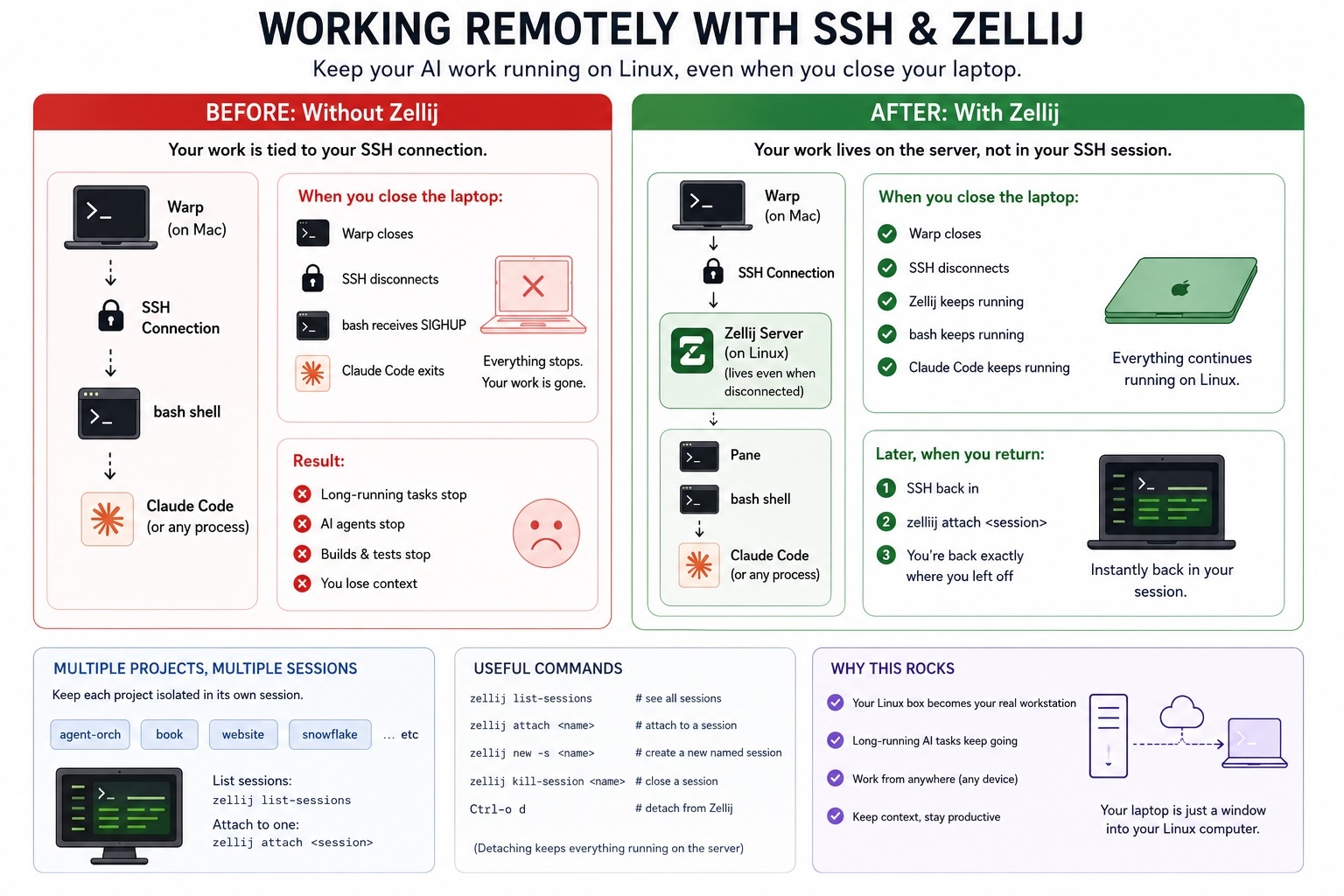
The pain? I work from my Mac laptop, and Claude Code or Codex often work for a long time. If I close my laptop, that kills the SSH session, which kills the coding session. Folks who live in Linux land solved this problem long ago with tmux. As I didn’t have that pain before, I’m late to learning this dog trick. I went with Zellij, a more modern take on the same idea.
I use Warp.dev as my Mac terminal, but this ability isn’t about the terminal you are using on your laptop. You install Zellij on your Linux box.
At first, it feels a little strange because you stop thinking of your laptop as “the computer doing the work.” Instead, your Linux machine becomes the computer doing the work, and your Mac becomes a window into it.
Before Zellij, my workflow looked like this:
Mac → SSH → Linux → Claude Code
My SSH connection was my terminal session. If I closed the lid on my MacBook, SSH disconnected, the shell exited, and Claude Code went down with it. If Claude had been in the middle of a long coding session, that work simply stopped.
Zellij inserts itself between SSH and your shell:
Mac → SSH → Zellij → Linux shell → Claude Code
That one change makes all the difference.
Zellij isn’t running on your Mac. It’s running on the Linux machine. Your SSH session is simply viewing what’s happening inside Zellij. When the SSH connection disappears, Zellij keeps running. Your shell keeps running. Claude Code keeps running. Builds continue. Tests continue. Agents continue working while your laptop is asleep in your backpack.
Later, maybe from the same laptop, maybe from another computer entirely, you SSH back into Linux and reconnect to that Zellij session. Instantly you’re looking at the exact same terminal, the same prompt, the same Claude conversation, as if you had never left.
SSHing into the Linux box was already turning my Mac into a window into Linux, and I like it that way. I could just Remote Desktop into the Linux box and work directly in Linux. In fact, I do just that when I want to run GUI Linux applications. But for terminal work, I prefer the Mac. I like macOS, and I especially like its copy-and-paste behavior. It’s a preference thing, for sure. To each his or her own. Now Zellij lets me keep that workflow while allowing long-running processes to continue on Linux even after I close my laptop. Pain point resolved.
Zellij (and tmux) do a lot more than this. You can split panes and have more than one session visible at the same time. I may never use those features, as I’m more of a multiple-full-screen kind of guy.
How hard is this to set up? Not hard at all. I SSH’d into my Linux box, installed Zellij, fired up a session, and it just worked. Since I’m not using the multiple-pane features, it feels just like a normal terminal session with a little chrome around the outside that happens to be Zellij.
I realize that the long-time Linux folks already know all of this. But maybe there are some other old dogs—or young pups—who’d benefit from this new trick.