


Lunduke
News • Science & Tech
Make Computers Fun Again - Linux, UNIX, Alternative Operating Systems, Computer History, and Retro Computing. Also dad jokes.
Interested? Want to learn more about the community?

I put together a list of ALL of the MattChat features I have implemented. I am posting this here, because I feel this is a VERY complete chat platform, and you folks here, would offer good feedback on things you think are whack or missing.

Any of you all want to maybe use something like this? Is federation with other MattChat servers something that would be wanted?

Without further ado here is 260+ lines of markdown:

1. Accounts & Authentication

  • Username + password registration and login with bcrypt-hashed passwords
  • Three server-configurable registration modes: open, closed (admin-created only), and invite-only (token-based)
  • JWT access tokens with refresh-token rotation and a 60-second grace window for mid-rotation network failures
  • Sessions table tracks active refresh tokens for revocation, device info, and IP
  • Server-forced password change on next login (set by admin)
  • Account self-service: update display name, status text, avatar, password
  • Account deactivation (by admin or self)
  • Short-lived WebSocket tickets for authenticated WS upgrade

2. Two-Factor Authentication (TOTP)

  • Optional per-user TOTP 2FA with QR-code provisioning
  • Admin-enforceable 2FA ("required" ) — user is prompted to set it up on next login and cannot proceed without completing enrollment
  • Forced-setup flow with separate confirm endpoint so enrollment can't be bypassed
  • Admin can reset or clear a user's 2FA from the admin panel

3. End-to-End Encryption

  • Per-conversation encryption toggle (defaults to on)
  • X3DH-style key exchange using identity key, signed pre-key, and one-time pre-keys (OTPKs) per device
  • Ed25519 signatures on signed pre-keys (real cryptographic signatures, not sentinels)
  • Double-ratchet session state per conversation, with out-of-order message handling
  • Multi-device support: each device has its own key bundle; messages are encrypted once per recipient device
  • Safety numbers (fingerprint) for out-of-band verification of a peer's identity
  • Identity-change detection with user-facing warning modal before sending
  • Automatic key-rotation handling (stale-session detection via key_generation counter)
  • Server-side OTPK replenishment signaling; client auto-uploads new OTPKs when the pool runs low
  • Per-requester rate limiting on key-bundle fetches (defense against OTPK-exhaustion attacks), with a rotation-aware exemption so self-heal on rotation still works
  • decrypt_failed back-channel: receivers can request an encrypted re-send from the sender via a dedicated resends table
  • Key recovery / regeneration modal for users with broken keys
  • Device-list management UI (view, remove old devices)
  • Explicit encrypted content type on messages so server + client can tell encrypted vs plaintext blobs without parsing

4. Messaging Core

  • Text messages with Markdown formatting (bold, italic, strikethrough, inline code, fenced code blocks)
  • Contextual Markdown preview button — only appears when the draft contains renderable Markdown, with Ctrl/Cmd+Shift+P shortcut
  • Emoji rendering inline
  • Message editing (with edited-at tracking)
  • Message deletion (soft delete)
  • Reply threading via reply_to_id with quoted reply preview bar above composer
  • Message forwarding to one or many conversations with a forwarded-from indicator
  • Copy message text to clipboard
  • Per-message context menu (reply, react, copy, edit, delete, forward, star, transcribe)
  • Message reactions: emoji reactions with toggle model (click same emoji again to remove)
  • Starred messages / bookmarks: per-user server-synced starred list with a dedicated browsing modal
  • Starred-view refinements: group-by-conversation toggle and search within starred messages
  • Optimistic send (message appears instantly; reconciled on server ACK; marked red on failure with tap-to-retry)
  • Drafts: per-conversation auto-saved drafts with Draft: indicator in the conversation list
  • Read receipts with per-conversation last_read_at tracking
  • Typing indicators with 3-second throttle; works around mobile IME quirks via compositionupdate/compositionend
  • Infinite scroll message history with IDB-cached pages for instant cold start
  • System messages (joins, leaves, name changes, call events, announcements)
  • Client-side message search (encrypted conversations) + server-side trigram search (plaintext conversations)

5. Attachments & Media

  • File uploads with resumable/backpressure-aware streaming (tolerates 10 GB files over slow connections)
  • Server sniffs and caches the real MIME type (doesn't trust client-supplied values)
  • Uploader-ownership enforcement: users can't attach someone else's uploaded file
  • Image, video, audio, and generic-file message types
  • Inline image and video rendering in message bubbles
  • Lightbox for full-screen image viewing with prev/next navigation and download
  • Media collections: consecutive image/video messages are visually grouped
  • Drag-and-drop to attach (drop overlay appears over the chat)
  • Per-conversation attachment avatars (conversation and user)
  • Attachment keys are E2E-encrypted per recipient

6. Voice Messages

  • In-app voice recording with live recording timer and cancel control
  • Waveform visualization for playback with click-to-seek
  • Voice transcription via bundled Whisper sidecar (ggml-tiny model) — user taps "Transcribe" and the transcript is stored and displayed inline

7. Conversations (DMs + Groups)

  • 1:1 direct messages
  • Group conversations with name, description, avatar
  • New-conversation modal with tabs for DM and group creation
  • User search (display name, username) for starting DMs or adding to groups
  • Conversation list with last-message preview, unread badge, draft indicator, mute indicator, favorite pin
  • Favorite conversations (pin to top)
  • Mute conversation (suppress notifications)
  • Per-conversation nicknames (rename a user just within one conversation)
  • Conversation settings modal (rename, avatar, members, encryption toggle, invite management)

8. Group Management

  • Roles: owner, admin, member
  • Add/remove members
  • Promote/demote to admin
  • Transfer ownership
  • Per-member posting permissions (admins can mute individual members from posting without kicking them)
  • Invite links with expiration, max-uses, revocation, and use-count tracking
  • Invite-accept flow for new members (with join confirmation modal)

9. One-to-One Calls

  • Audio and video calls over WebRTC
  • Incoming call overlay with accept/reject, outgoing call overlay with status, active call overlay with controls
  • Mute, camera toggle, speaker toggle, camera switch (front/back on mobile)
  • Screen sharing (replaces video track during share; restores camera on stop)
  • In-call gear menu for device switching
  • Device picker for mic/camera/output selection
  • Call quality indicator
  • Call timer
  • Call decline via push notification action (works when app is backgrounded or closed)
  • Call-end and call-decline REST endpoints used by the service worker
  • Call events logged as system messages in the conversation timeline (with duration and bandwidth used)

10. Group Calls

  • Two modes with admin-pickable strategy:
    • Mesh (peer-to-peer) for ≤ 5 participants — direct connections
    • SFU (mediasoup) for larger calls — server-relayed media
  • Group audio and group video calls
  • Participant list panel with live count
  • Local PiP (picture-in-picture of own camera) with camera-off placeholder
  • Mute, camera, screen-share, camera-switch controls per participant
  • Gear menu for in-call device switching
  • "Join in progress" banner on the conversation when a call is already active
  • DB-enforced uniqueness so only one active group call per conversation (race-safe)
  • Bandwidth tracking per call event

11. TURN / STUN / SFU Configuration (admin-side)

  • Admin-configurable STUN and TURN servers for WebRTC NAT traversal
  • HMAC-based ephemeral TURN credentials with configurable TTL (turn_secret, turn_secret_ttl)
  • Server-relayed audio toggle for tricky network conditions
  • mediasoup announced-address hot-swap (runtime update without restart)
  • IP auto-detection helper for SFU setup

12. Push Notifications

  • Web Push with VAPID keys (rotatable via server metadata store)
  • Per-device subscription management (unique per user+endpoint)
  • Always-notify toggle per subscription (foreground vs background behavior)
  • Push payloads correlated with the per-device crypto deviceId so the server can send a slimmed E2E envelope (only the keys that device needs)
  • Notification actions: accept call, decline call, mark read, reply (decline works even with app closed — the service worker hits /api/call/decline)
  • Admin tools: send test push, view all subscriptions, delete stale subscriptions, run bulk cleanup

13. Progressive Web App

  • Installable PWA (manifest with icons, maskable variants, screenshots for desktop and mobile form factors)
  • Standalone display mode
  • Service worker for offline shell, asset caching, and push handling
  • Badging API: unread-count badge on the home-screen icon (installed PWA)
  • Share Target API: receive files (images, video, audio, PDFs, text) shared from other apps via the OS share sheet
  • Update banner when a new service-worker version is available
  • Skip link for keyboard-accessibility

14. Themes & UI

  • Light and dark themes with toggle button
  • Theme icons swap (sun/moon) with "brand time" (sun during day, moon at night) variants
  • System-respectful defaults, user preference persisted
  • Responsive layout (separate chat-list screen on mobile, side-by-side on desktop)
  • Back button on mobile conversation view
  • Accessible roles and ARIA labels throughout

15. Link Previews

  • Automatic Open Graph scraping for URLs in messages
  • Preview cards with title, description, and thumbnail
  • Server-cached link metadata (avoids re-fetching the same URL)
  • Image proxy (/api/preview/image?url=...) to keep client IPs off third-party servers

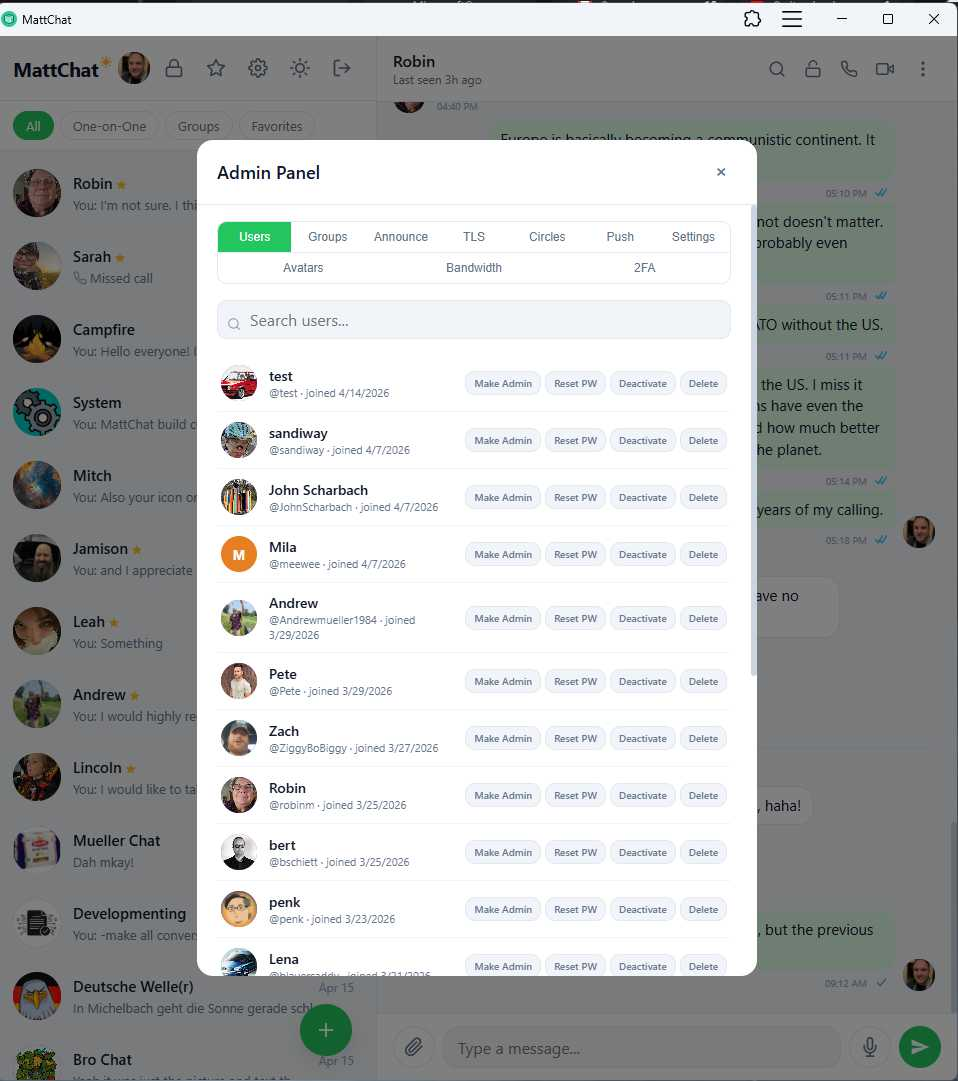
16. Admin Panel

  • Dedicated admin modal with full server management
  • User management: create, list, search, deactivate, reset password, force password change, make/remove admin, edit avatar, manage 2FA, view user info
  • Registration control: switch between open/closed/invite-only; create, list, and revoke invite codes with expiry + max-uses
  • Conversation browser: list all groups on the server. Conversations are not possible to view even unencrypted.
  • Visibility circles: named groups that control which users are discoverable to which others (e.g., students can only see students + teachers)
  • Server settings UI: rate limits, TURN config, SFU config, registration mode, system announcement, etc.
  • System announcement broadcast: push a system message to every active conversation
  • Bandwidth dashboard: aggregated call data-transfer metrics
  • Caddy integration: view certificate status and trigger renewal from the panel
  • Push tooling: test push, view all subscriptions, clean up stale ones

17. Visibility Circles

  • Admin-defined named groups controlling who can see whom in user search
  • Per-user membership (one user can be in multiple circles)
  • Enforced at user-search and new-conversation time

18. Security & Rate Limiting

  • HTTP and WebSocket rate limits configurable from the admin panel at runtime
  • Separate per-requester caps on key-bundle fetches (OTPK-exhaustion defense), rotation-aware
  • Slowloris defense: 30-minute cap on request body arrival, terminating trickle uploads
  • Server-side file-size limits per route (separate from the 10 GB global ceiling)
  • trustProxy configuration for deployment behind Caddy
  • Admin-on-admin mutation guard (admins can't edit other admins without ownership-like protections)
  • Per-route auth guards and role checks

19. Composer / Input Area Features

  • Auto-resizing textarea
  • Ctrl/Cmd+Enter to send (configurable enter-to-send behavior)
  • Paste-to-attach for images
  • Drag-and-drop attachments
  • Reply bar with cancel button
  • Recording indicator during voice capture (separate row that replaces the input)
  • Markdown preview toggle — hidden by default, appears only when the draft contains complete Markdown syntax; keyboard shortcut Ctrl/Cmd+Shift+P
  • Per-conversation draft persistence (in memory, debounced to IndexedDB)

20. Storage & Offline Resilience

  • IndexedDB caches conversation list, message pages, drafts, and plaintext for decrypted messages
  • Instant cold-start from IDB before the network fetch returns
  • Batched IDB reads for plaintext priming (single transaction for a whole page)
  • Stale-cache guards (reject old v1/v2 envelope formats found in the cache)
  • Background-hydration of per-conversation message caches on load
  • Idle-time scheduling (requestIdleCallback) for link previews, media regrouping, and old-plaintext purging
  • Service-worker offline shell

21. Deployment

  • Docker Compose stack with app, Postgres, Caddy (reverse proxy + automatic HTTPS), and whisper-sidecar containers
  • Single-container Dockerfile build
  • Entry-point script handles migrations, seeding, and startup ordering
  • Staged SQL migrations (36+ stage files) applied via _migrations tracking table
  • Configurable via environment (domain, DB connection, secrets, VAPID keys, etc.)

22. Developer / Operational Niceties

  • Health endpoint (/api/health) for readiness probes
  • Structured Fastify logging (info in prod, debug in dev)
  • Auto-derived CORS origin based on DOMAIN config (handles localhost, raw IPs, explicit protocol, bare domains)
  • TypeScript throughout the server; watch-mode dev via tsx
  • Seed script for initial admin/user data

Notable Small Touches

  • Input field composes correctly with IME/predictive keyboards on mobile (typing events fire even when input doesn't)
  • Optimistic bubbles reconcile against the WS broadcast coming back — no duplicate bubbles on fast networks
  • "Nothing to preview yet" placeholder in the Markdown preview pane
  • autoResizeTextarea runs after draft-load and after sends so the height never jumps
  • Safety-number display has both raw and QR-code variants for verification
  • Call system messages render with duration and data-transferred inline
  • Reply bar auto-closes when the user starts editing an existing message
  • Preview mode force-resets on conversation switch (session-local, not persisted across switches)
post photo preview
Interested? Want to learn more about the community?
What else you may like…
Videos
Podcasts
Posts
Articles
Red Hat Devs Forced to Use AI or "Find Another Job"

Red Hat ties financial bonuses to Al use, encourages writing Fedora Linux code with Al, writes articles with Al, buys Al companies, and now makes Al a job requirement.

More from The Lunduke Journal:
https://lunduke.com/

00:12:09
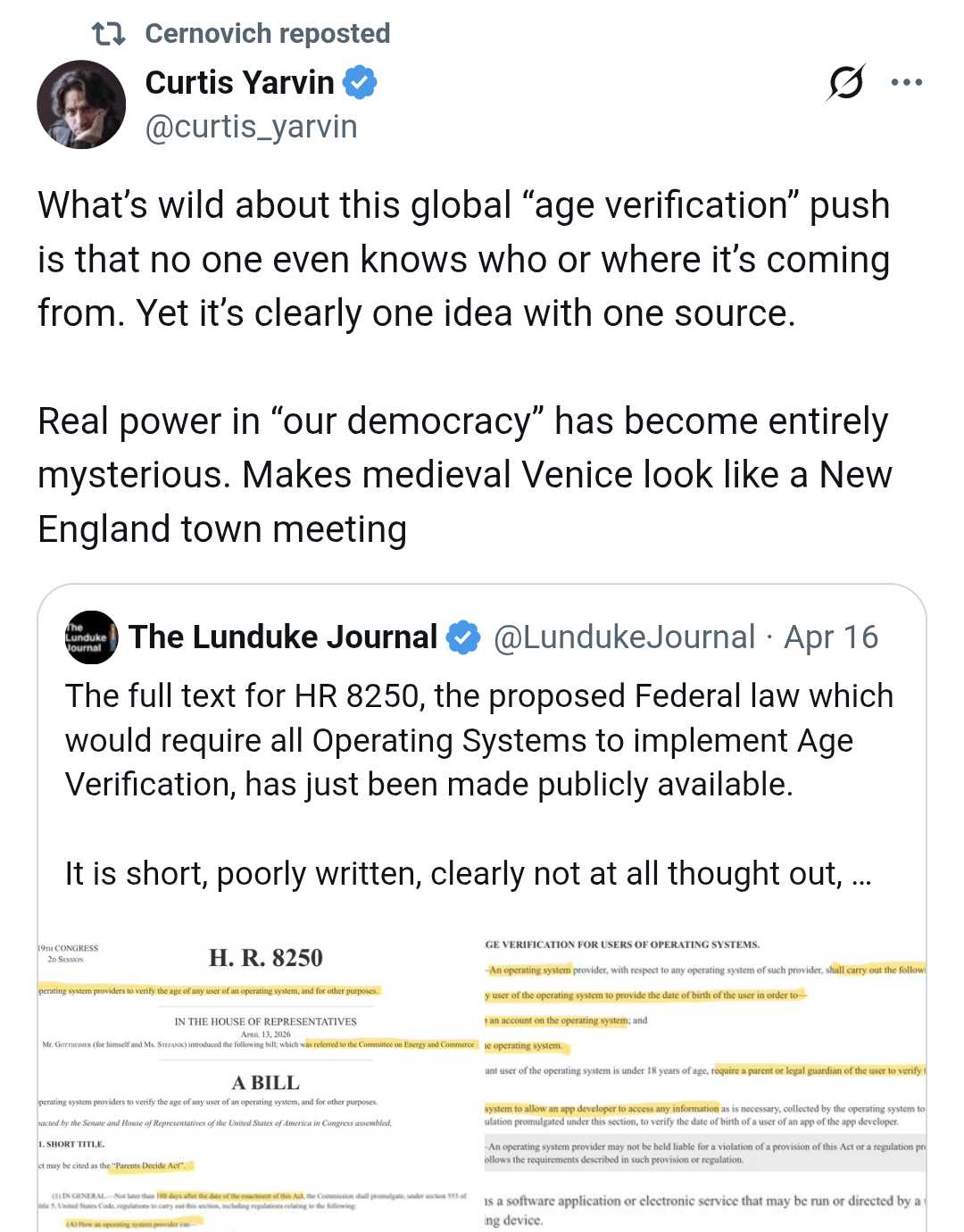
We Have the Full Text for the Federal OS Age Verification Bill

The details of HR 8250 are even worse than we thought. Plus: Who, really, is behind these Operating System Age Verification laws?

More from The Lunduke Journal:
https://lunduke.com/

00:36:46
New Federal Law to Require Age Verification on All Operating Systems

H.R. 8250 ("To require operating system providers to verity the age of any user of an operating system, and for other purposes." ) has been introduced in the U.S. Congress.

Operating System Age Verification Tracker:
https://github.com/BryanLunduke/DoesItAgeVerify

More from The Lunduke Journal:
https://lunduke.com/

00:27:42
November 22, 2023
The futility of Ad-Blockers

Ads are filling the entirety of the Web -- websites, podcasts, YouTube videos, etc. -- at an increasing rate. Prices for those ad placements are plummeting. Consumers are desperate to use ad-blockers to make the web palatable. Google (and others) are desperate to break and block ad-blockers. All of which results in... more ads and lower pay for creators.

It's a fascinatingly annoying cycle. And there's only one viable way out of it.

Looking for the Podcast RSS feed or other links? Check here:
https://lunduke.locals.com/post/4619051/lunduke-journal-link-central-tm

Give the gift of The Lunduke Journal:
https://lunduke.locals.com/post/4898317/give-the-gift-of-the-lunduke-journal

The futility of Ad-Blockers
November 21, 2023
openSUSE says "No Lunduke allowed!"

Those in power with openSUSE make it clear they will not allow me anywhere near anything related to the openSUSE project. Ever. For any reason.

Well, that settles that, then! Guess I won't be contributing to openSUSE! 🤣

Looking for the Podcast RSS feed or other links?
https://lunduke.locals.com/post/4619051/lunduke-journal-link-central-tm

Give the gift of The Lunduke Journal:
https://lunduke.locals.com/post/4898317/give-the-gift-of-the-lunduke-journal

openSUSE says "No Lunduke allowed!"
September 13, 2023
"Andreas Kling creator of Serenity OS & Ladybird Web Browser" - Lunduke’s Big Tech Show - September 13th, 2023 - Ep 044

This episode is free for all to enjoy and share.

Be sure to subscribe here at Lunduke.Locals.com to get all shows & articles (including interviews with other amazing nerds).

"Andreas Kling creator of Serenity OS & Ladybird Web Browser" - Lunduke’s Big Tech Show - September 13th, 2023 - Ep 044

Wild to see Lunduke getting QTed by Moldbug and Cerno. Containment escaped.

post photo preview

🤔 I've heard that looking for work in California is a little different.
("Your Mileage May Vary" )
💾 Show Red Hat how much work you plan to do, as compared to the A.I. Code Agents.

Babylon Bee: Gen Zer Puts On Her Nice Pajamas For Job Interview
https://babylonbee.com/news/gen-zer-puts-on-her-nice-pajamas-for-job-interview

BSD Week has begun over on the forum! https://forum.lunduke.com/t/bsd-week-begins/4118 Please feel free to participate, either there or here.

Last call for the "Amiga" Lifetime Subscriber Wall. It's almost full!

Holy smokes, that was fast.

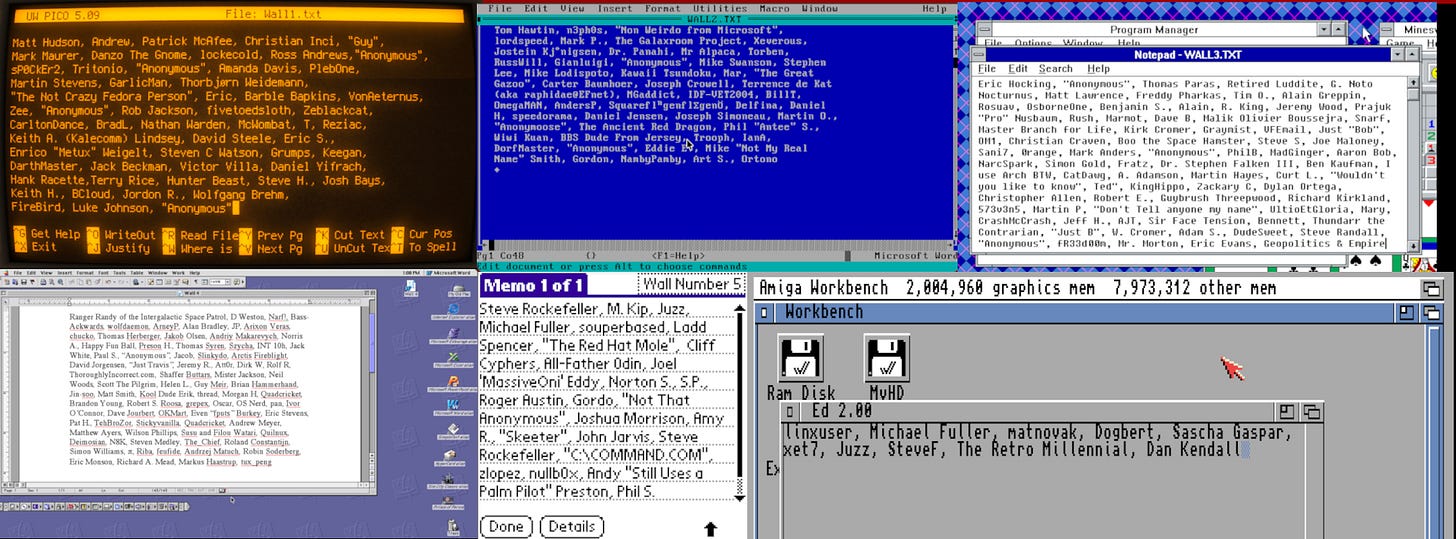
The 6th Lunduke Journal Lifetime Subscriber Wall (aka the “Amiga OS 3.1” Wall) was introduced… what… a week ago?

I kid you not, the darn thing is already almost full! I was wildly unprepared for how popular this would be!

There’s enough space left for maybe 5 or 6 more names. Tops. Then I’ve gotta declare “Wall 6 (Amiga) is Full” and start Wall Number 7!

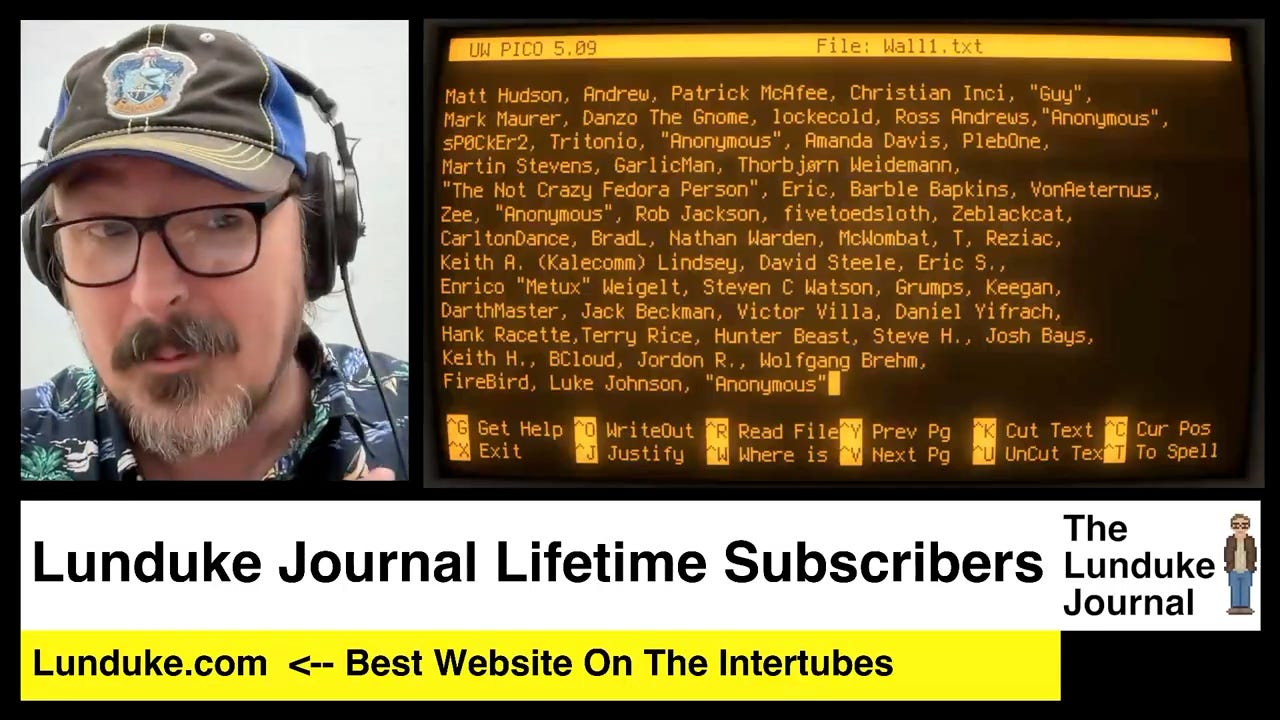
Here’s what all of the Lifetime Subscriber Walls look like (each shown at the end of every Lunduke Journal video):
 

If you want to get onto the Lifetime Subscriber Wall (and have any chance of making it onto the Amiga Wall before it’s full) here’s what you need to do (and do it quickly):

  1. Grab a Lifetime Subscription to The Lunduke Journal (if you don’t already have one).

    1. A Lifetime Sub includes all the standard perks (plus a few) and can be picked up via Locals, Substack, or Bitcoin (whichever you prefer).

  2. Email “bryan at lunduke.com” and let me know how you would like your name displayed (“Joe A.”, “Joseph Arnold”, “JoeyPants”, “SirJJMcManly”, etc.)

It’s first come, first served.

If you’ve already emailed me about being added to the wall, your spot is secured.

For the rest of you: Chop chop. At the current rate, I would be very surprised if the “Amiga Wall” wasn’t full by some time this weekend.

“Lifetime Wall 7” will be unveiled after the final name is added to the Amiga Wall. And, yes, it will be a different (awesome) retro computing platform.

As always, a huge thank you to every subscriber to The Lunduke Journal. Absolutely none of this would be possible without your support.

-Lunduke
Read full Article
post photo preview
Amiga Lifetime Wall & March Lunduke Journal Stats!

Hello all of you amazing Lunduke Journal subscribers!

With March now behind us, I wanted to give you crazy kids a quick “behind the scenes” look at the stats for The Lunduke Journal. Because Inside Baseball stuff is fun.

The Amiga Wall!

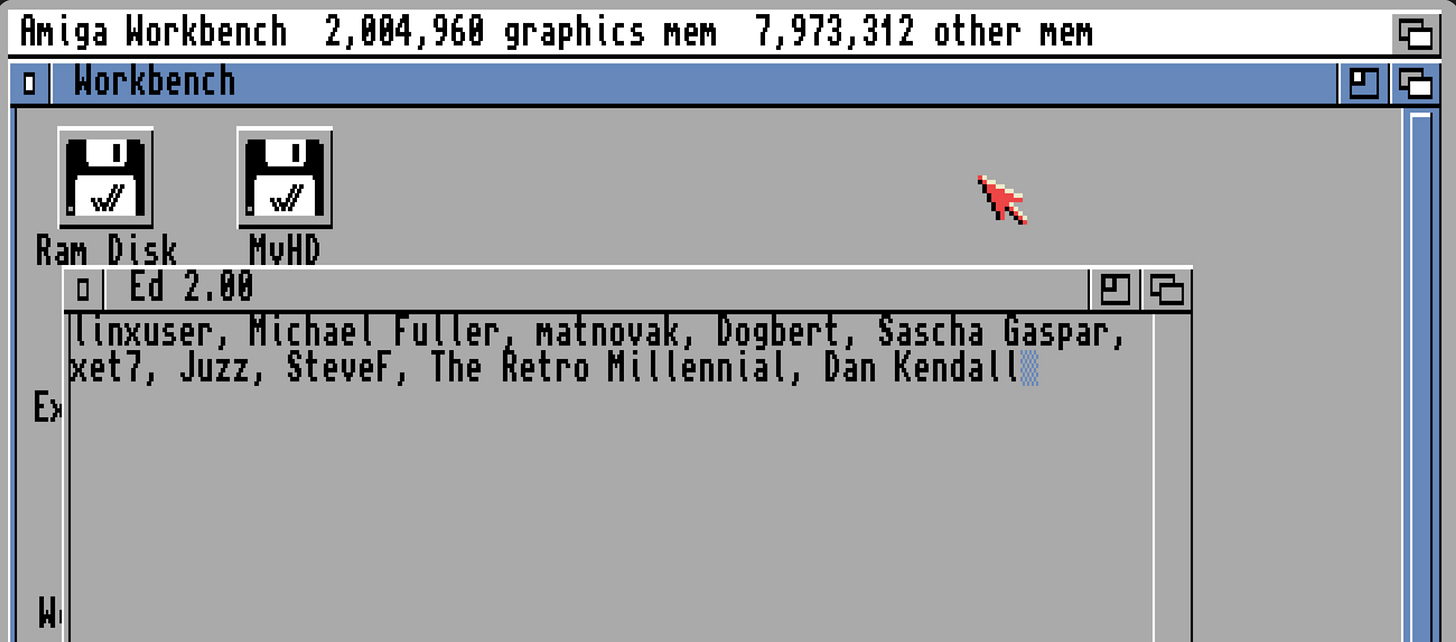
But before we dive into charts and numbers… behold! The brand new 6th Lifetime Subscriber Wall of Shame Awesomeness! The AmigaOS 3.1 Wall!


Every Lifetime Subscriber Wall (which I show at the end of each video) is a real screenshot from a different computing platform. Mostly retro. All awesome.


If you’d like to see your name listed on the new AmigaOS 3.1 wall, grab a Lifetime Subscription (if you don’t already have one) and toss me an email. I update the walls about once each week with new names.

The last few Lifetime Walls filled up incredibly quickly. So if the Amiga Wall interests you, I wouldn’t wait too long. Hint, hint.

March 2026 Stats

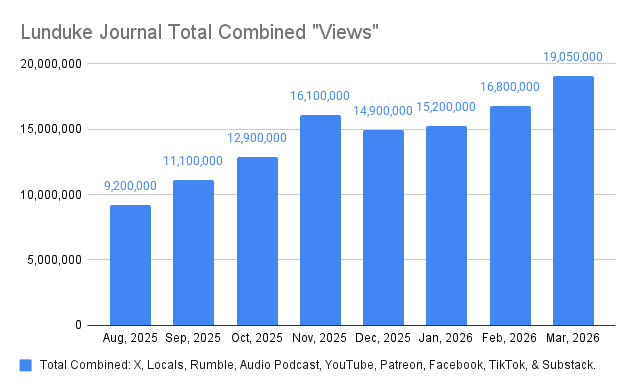
The big news: Total “views” were way, way up in March.

A fair bit beyond what was anticipated. A hair over 19 million during the month.


That’s in total, across all platforms. As usual, the audio podcast and X lead the way in terms of total views/listens for shows (by quite a lot).

Interestingly, we saw significant “views” growth on even the smallest platforms in March (Facebook and TikTok).

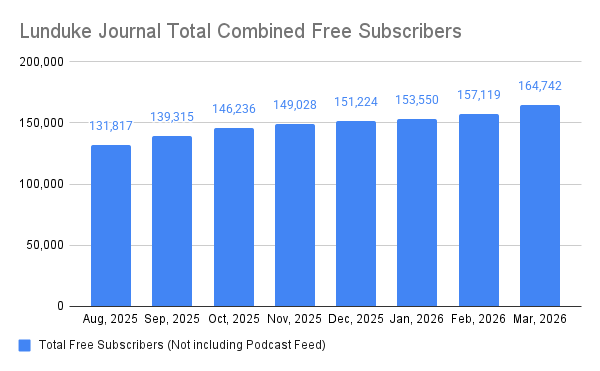
Free subscribers also took a major jump in March, with the largest one month gains ever (I’m pretty sure, certainly the largest this year or last). Up 7,623 over the month before.


Again, new subscribers grew across the board. The biggest gains were seen on X, but all platforms saw a significant bump.

Hard to complain about that!

The top 3 shows for March were all focused on the Age Verification laws:

While those were the top 3… it’s worth noting that the top 10 (and, really, the top 15 or so) shows for the month were all incredibly close in terms of viewership numbers.

As always, a huge thank you to all of The Lunduke Journal subscribers. You make all of this possible.

-Lunduke

Read full Article
Lifetime Wall Number 6, Plus How to Access MP4s & Forum

A few quick reminders for all of you amazing Lunduke Journal subscribers:

First: If you have any kind of payed subscription (Monthly, Yearly, or Lifetime) there are a bunch of cool perks available to you. MP4 Downloads, PDF eBooks, and access to the Lunduke Journal Forum. All the details on how to gain access to everything is right here.

Enjoy.

Second: At the end of this next week I’ll be unveiling “Lifetime Subscriber Wall of Shame” number Six at the end of all new Lunduke Journal videos.


At that same time I will be updating and permanently locking down Walls 1 through 5.

If you are already a Lifetime Subscriber, and would like to be added to the new Wall number 6 (or to one of the couple remaining spots on Walls 4 and 5), email me (bryan at lunduke.com) with how you would like your name to be displayed (full name, first name only, nick name… any way you like).

  1. CRT Linux Pico Wall: Full

  2. DOS Word Wall: Full

  3. Win 3.11 Notepad Wall: Full

  4. MacOS 9 Wall: 2 Spots Left

  5. PalmOS Wall: 1 Spot Left

  6. Mystery Wall: Open

Those final spots on the MacOS and PalmOS Walls are first come first served. The first people to request those spots get them.

Everyone else will roll over into Wall 6. Which is a secret, retro computer platform. You’ll dig it.

If you have already contacted me regarding being added to one of these walls (or changing the way your name is displayed), I’ve already got you on the list for the changes later this next week.

If you don’t already have a Lifetime Subscription, grab one and get yourself on the wall.

It’s pretty sweet.

-Lunduke

Read full Article
See More
Available on mobile and TV devices
google store google store app store app store
google store google store app tv store app tv store amazon store amazon store roku store roku store
Powered by Locals