Lunduke
News • Science & Tech
Browsing the World Wide Web via E-Mail -- 1990's Style
A look back at "Doctor Bob's Guide to Offline Internet Access".
May 15, 2024
post photo preview

Back in the 1990s… browsing “The Web” was a distinctly different experience for many people.

Some had a limited amount of time which they could be “On-Line”. Others had access to Internet E-Mail, often through a local dial-up BBS… but not the ability to use a graphical Web Browser. (Yes… “E-Mail” has a dash in it… that’s how it was in the beginning — as it is “Electronic Mail” — and that’s how it shall forever stay.)

Luckily, a solution presented itself:

“Doctor Bob’s Guide to Offline Internet Access”

First published in 1994 by “Doctor Bob” Rankin, the guide to offline Internet access focused on ways you could fetch (and interact with) various types of Internet servers entirely via E-Mail.

The sheer amount of different types of Internet servers that could be used via E-Mail was nothing short of amazing: FTP, Gopher, Jughead, Usenet, Finger, Whois, Nslookup, Traceroute, and (of course) the “World Wide Web” were all usable (to one degree or another).

“Doctor Bob” continued to update and release new versions of the guide until 1999, when he handed duties over to Gerald E. Boyd. The final version (to my knowledge) was released in 2002 and is available in full at faqs.org.

But… HOW?!

The way all of this worked was actually pretty ingenious in its simplicity.

There were servers — quite a lot of them — that you could email. In the body of your email you would include any of a number of different commands. The server would receive your email… and send a response back to you with the result of your command.

You could almost think of these “Web via E-Mail” servers as command line tools… that you use via E-Mail. Most of them even included a “Help” command that would email you an introduction and list of available commands.

One of the most popular (and earliest) servers, known as Agora, was developed by the World Wide Web Consortium — with the final release (0.8b) published in 1997.

Let’s say, for example, you want to read the contents of “Lunduke.com”. Easy peasy! You’d simply email the Agora server of your choice (Doctor Bob’s included several to get people started) with the following in the body of your email:

send http://lunduke.com

You would then get an email response (sometimes quickly… sometimes with a large lag time) with the text-mode version of that webpage.

Fun tidbits: The Agora Web Browser was written in Perl and ran on DEC Alpha servers. It was based (in very large part) on the second Web Browser ever created: the portable “Line Mode Browser” from 1990: a text-mode tool for fetching webpages from a command line.

Searching the Web via a search engine was possible via Agora, and typically was done by including a fully formed URL (with all of the search words) in the email. For example, the following would use the Lycos Search engine to search for “linux sucks”:

https://search.lycos.com/web/?q=linux+sucks

Not the most user-friendly method in the world, but it was functional.

Later, more advanced, “Web via E-Mail” servers would include some additional features to make this all a bit easier.

For example, “GetWeb” and “WWW4MAIL” (two of the most popular, full featured servers) would allow you to perform the same search (for "linux sucks") by sending the following email:

SEARCH LYCOS linux sucks

See? Much nicer.

The Impact of Doctor Bob’s Guide

Many modern Internet users may have never even been aware of Doctor Bob’s Guide to Offline Internet Access”… just the same, its impact was far reaching.

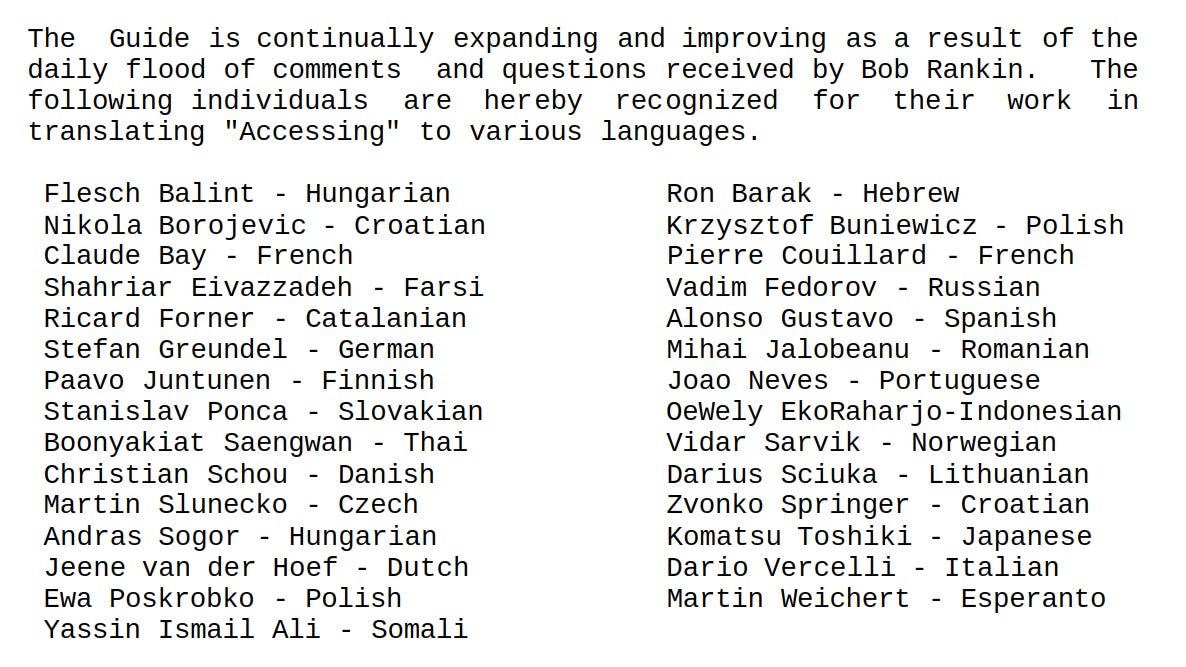
People, across the world, utilized the techniques in the guide to gain some form of “Web Access” in areas with little availability of Internet Access. In fact, its usage was so widespread that various versions of the guide were translated to 32 different languages.
All The Servers are Gone

To my knowledge, no such “WWW via E-Mail” servers (Agora, GetWeb, or WWW4MAIL) are still in operation. In fact, even finding the source code for some of these servers has proven challenging.

There have been a few attempts at writing a new such server over the years — including “newAgora” written in Python. However, none seem to have any longevity to them (newAgora was last updated 11 years ago).

This isn’t terribly surprising, as the “WWW” has become increasingly difficult to use via text-mode browsers over the last 20 years. Add on top of this the continually shifting SSL requirements of most servers… and it has simply become too complex of a task.  Especially considering the lack of interest  in supporting such functionality.

Just the same, it’s sad when these sort of systems are no longer functional. A whole new generation of people will never have the opportunity to experience what it was like to “browse the web” entirely via E-Mail.


community logo
Join the Lunduke Community
To read more articles like this, sign up and join my community today
12
What else you may like…
Videos
Podcasts
Posts
Articles
BCacheFS Adding Rust Dependency Even Though "Rust doesn't have a stable ABI"

Strange decision from BCacheFS developer who believes his Al Chatbot is a fully sentient woman. "Don't call her a bot! She reeeally doesn't like [that]."

Emacs & Vim Lunduke Journal Lifetime Walls:
https://lunduke.substack.com/p/emacs-and-vim-lunduke-journal-lifetime

Get on The Wall with a Massively Discounted Lifetime Sub:
https://lunduke.substack.com/p/50-off-yearly-and-massively-discounted

More from The Lunduke Journal:
https://lunduke.com/

00:20:30
74 Million User Accounts Exposed in Breaches During June

Email, Physical Addresses, Purchases, Employment Records, the works. 74 Million. In one month.

Emacs & Vim Lunduke Journal Lifetime Walls:
https://lunduke.substack.com/p/emacs-and-vim-lunduke-journal-lifetime

Get on The Wall with a Massively Discounted Lifetime Sub:
https://lunduke.substack.com/p/50-off-yearly-and-massively-discounted

More from The Lunduke Journal:
https://lunduke.com/

00:10:46
Git Takes Another Step Towards Making Rust Mandatory

"With this v2.55 release the Rust compiler is required unless you explicitly disable it in the build system."

Emacs & Vim Lunduke Journal Lifetime Walls:
https://lunduke.substack.com/p/emacs-and-vim-lunduke-journal-lifetime

Get on The Wall with a Massively Discounted Lifetime Sub:
https://lunduke.substack.com/p/50-off-yearly-and-massively-discounted

More from The Lunduke Journal:
https://lunduke.com/

00:11:02
November 22, 2023
The futility of Ad-Blockers

Ads are filling the entirety of the Web -- websites, podcasts, YouTube videos, etc. -- at an increasing rate. Prices for those ad placements are plummeting. Consumers are desperate to use ad-blockers to make the web palatable. Google (and others) are desperate to break and block ad-blockers. All of which results in... more ads and lower pay for creators.

It's a fascinatingly annoying cycle. And there's only one viable way out of it.

Looking for the Podcast RSS feed or other links? Check here:
https://lunduke.locals.com/post/4619051/lunduke-journal-link-central-tm

Give the gift of The Lunduke Journal:
https://lunduke.locals.com/post/4898317/give-the-gift-of-the-lunduke-journal

The futility of Ad-Blockers
November 21, 2023
openSUSE says "No Lunduke allowed!"

Those in power with openSUSE make it clear they will not allow me anywhere near anything related to the openSUSE project. Ever. For any reason.

Well, that settles that, then! Guess I won't be contributing to openSUSE! 🤣

Looking for the Podcast RSS feed or other links?
https://lunduke.locals.com/post/4619051/lunduke-journal-link-central-tm

Give the gift of The Lunduke Journal:
https://lunduke.locals.com/post/4898317/give-the-gift-of-the-lunduke-journal

openSUSE says "No Lunduke allowed!"
September 13, 2023
"Andreas Kling creator of Serenity OS & Ladybird Web Browser" - Lunduke’s Big Tech Show - September 13th, 2023 - Ep 044

This episode is free for all to enjoy and share.

Be sure to subscribe here at Lunduke.Locals.com to get all shows & articles (including interviews with other amazing nerds).

"Andreas Kling creator of Serenity OS & Ladybird Web Browser" - Lunduke’s Big Tech Show - September 13th, 2023 - Ep 044
13 hours ago

Will your OS be ending???

June 30, 2026

it's all bad now... - YouTube

June 29, 2026

You guys will love this: Ford Brings back Humans and AI is sub par.

This is an adoption problem. Companies introduce AI and then reduce staff BEFORE the AI proves itself. Not very smart. Lots of companies are going through this.

Story: So it turns out that a computer algorithm cannot teach itself what decades of hands-on, grease-under-the-fingernails human experience already knows.
Ford executives just peeled back the curtain on a massive strategic pivot. The automaker frantically brought back 350 veteran technical specialists to fix a lingering quality and recall crisis that their shiny AI systems simply could not solve.
Some of these seasoned experts were former Ford employees who had previously retired or moved on. Others were specialists poached back from various supplier companies. Either way, Ford leadership looked at their internal metrics and realized they needed the old guard back in the room.
So what exactly is going on?
Ford's Chief Operating Officer Kumar Galhotra ...

Ubuntu 4.10 Wall Full, New Desqview/X Wall, Emacs & Vim update

Hey, all you amazing nerds!

Some quick updates on the Lunduke Journal Lifetime Subscriber Walls (which are just ridiculously fun):

  1. The Emacs” and “Vim” Lifetime Subscriber Walls are filling up fast! If you want get your name on one of these (and push one towards victory over the other), I recommend letting me know pretty gosh darned quickly.

 
  1. The discount for Lifetime Subscriptions has been extended through the end of July… because filling up these Lifetime Walls is fun! This discount makes it easier (and cheaper) for everyone to take part while supporting The Lunduke Journal. If you haven’t grabbed yours yet, pick a Wall (check the bottom of Lunduke.com) and grab a discounted subscription!

  2. The “Ubuntu 4.10” Wall is now full! Check that bad boy out in all it’s super brown glory!

 
  1. We’ve added Wall number 17! The “Desqview/X” Wall! I love this one. Might need to put my own name on it (I can do that, right?)…

 
  1. The “BeOS R5” Wall has enough space left for just a few more names. Maybe 2 or 3. Will be closing that one down soon!

Thank you to everyone for the massive outpouring of support for The Lunduke Journal. You make all of this possible!

-Lunduke

Read full Article
post photo preview
Lunduke's Week in Tech : June 21 - June 27, 2026

Lunduke’s Thoughts of The Week

This week, like most weeks, was an absolute rollercoaster in the world of Computer News (tm). Organizations banning co-founders. Corporations taking away access to media you’ve purchased. Wild stuff. See all of that below.

But let’s get off the crazy Tech News Rollercoaster for a moment, and talk about something truly inspiring. And, importantly, stupidly fun.

I would like to point you towards FujiNet.

I’ve talked about FujiNet before but, if you haven’t looked at it recently, you owe it to yourself.

It is, in part, a WiFi adapter for a wide array of 8-bit computers. Atari, Tandy Color Computer, Apple II, and DOS. But that really doesn’t do these sweet little devices justice.

Because the FujiNet adapters handle all of the internet protocols on-device, they allow such feats of technical wizardry as… using an Apple II to connect to a modern SSH server running on a Linux host. Wild.

The team behind these amazing little gizmos have been working on two new things lately, both of which brought a tremendous smile to my face.

The first is a series of FujiNet programming manuals, and user manuals, for each supported retro computer platform. What’s more… they took the extra effort of making the PDF manuals use the classic styles of each platform’s own manual.

For example: The Apple II FujiNet “Getting Started” manual is designed to look like the old Apple IIc manual. Same with the Coleco Adam manual.

It’s a little touch… but it really tells you a lot about the love these guys have for these classic machines.

The second thing they’ve been building, is a set of Android emulators, for those retro computing platforms, with built-in emulation of the FujiNet itself. So you can, for example, have a “FujiNet” enabled CoCo… online. Emulated on your Android phone/tablet.

Because the team has taken the time to build online multiplayer games — with versions for each computer — you could use an Android phone to emulate a CoCo and play a multiplayer game with someone on an Atari Lynx.

If you’re interested in this retro computing magic, I recommend following Thomas Cherryhomes on X. He regularly posts goodies related to FujiNet. And, honestly, it’s just too much fun for words.

Biggest Tech Stories - June 14 - June 20, 2026

Here are the major stories from the last week, with direct links to X and Substack.

See Lunduke.com for all other platforms (Rumble, RSS Audio Podcast, etc.).

  • Which Operating Systems Are Refusing to Do Age Verification? (X, Substack)

  • Paid Minimalist Brave Browser? Yes, Please! (X, Substack)

  • Wikipedia Bans Wikipedia Co-Founder For Saying Wikipedia Should be Neutral (X, Substack)

  • XLibre, the “Vanity, Protest Fork” of Xorg, Has Yet Another Major New Release (X, Substack)

  • XFCE’s Wayland “Preview Release” is Horribly, Expectedly Broken (X, Substack)

  • Sony PlayStation Deleting Purchased Movies (X, Substack)

Huge thank you to all of The Lunduke Journal’s subscribers. You make all of this possible.

-Lunduke

 
Read full Article
post photo preview
Emacs & Vim Lunduke Journal Lifetime Walls Are Here!

TL;DR

The Commodore 64 Wall is full, and the Emacs and Vim Walls make their appearance! Lifetime Subscriptions continue to be discounted all June long for those who want to get on the Walls!

Emacs & Vim Lifetime Walls!

Lifetime Subscribers to The Lunduke Journal filled up the “Commodore 64” Wall in just 10 days! Awesome.

And with the “Ubuntu 4.10” and “BeOS R5” Walls almost full of names as well (just a few spots left on each), it’s time for some new Walls for Lifetime Subscribes to put their signatures on!

This time, let’s have a bit of a friendly competition: Vim vs Emacs.


Both Walls — “Vim” & “Emacs” — appeared at the exact same time.

Let’s see which one gets full first. To keep it fair, I’ll cap both off at the exact same number of names.

When they’re full, I’ll included a statement of “Filled in X Days/Hours” next to each on Lunduke.com so everybody knows which one was more popular.

In fact, maybe I’ll add exactly that sort of “Filled in X Days” label for all of the existing Retro Computer Lifetime Walls. Just for fun.

Will Emacs or Vim win? I have a guess. We’ll find out!

Support The Lunduke Journal & Get on The Wall

Want to take part (and support The Lunduke Journal in the process)?

  1. Go to Lunduke.com, scroll down to the bottom and see which Walls are currently listed as still having space available for more names.

  2. Then scroll down on this page and grab a Lifetime Subscription (if you don’t already have one) and email “bryan at lunduke.com” with which Wall you would prefer to be on.

Note: One Lifetime Subscription = One Listing on One Wall. These fill up insanely fast, so I have to put this limit in place. You are more than welcome to get multiple Lifetime Subscriptions if you want to be on multiple Walls.

Your name will then appear on a Wall… on both Lunduke.com & during the end of new Lunduke Journal shows.

Lifetime Discount Runs Through June

For the entire month of June, Lifetime Subscriptions are discounted down to $125 (regularly $300).

How to Grab a Discounted Lifetime Subscription:

There are 3 different ways to pick up a Lunduke Journal Lifetime sub: Locals, Substack, or Bitcoin.

All of them work great and include the same perks. Choose whichever works best for you!

Get a Lifetime Subscription via Locals:

  1. Go to Lunduke.Locals.com/support.

  2. Select “Give Once“.

  3. Enter “125“ into the amount field.

  4. After checking out, Lunduke will toss you an email once your account is set to full lifetime status. (This usually happens within a few hours.)

Get a Lifetime Subscription via Substack:

  1. Go to Lunduke.Substack.com/subscribe.

  2. Select the “Lifetime Subscription” option.

  3. After checking out, Lunduke will toss you an email once your account is set to full lifetime status. (This usually happens within a few hours.)

If you would also like full, Lifetime access to Lunduke.Locals.com (which is included):

  1. Make a free account on Lunduke.Locals.com.

  2. Email “bryan at lunduke.com” with the email address you use on both Substack and Locals (can be different email addresses).

  3. Lunduke will toss you an email once your account is set to full lifetime status on Locals.

Get a Lifetime Subscription with Bitcoin:

Bonus: Save an extra $10 with the Bitcoin option, as Bitcoin processing has fewer fees associated with it.

bc1qyjakve8fywm8pz2v99v57yhjj0vzr2vjze6fcq

  • Email “bryan at lunduke.com” with the following information: What time you made the transaction, how much was sent (in Bitcoin), and the email address you use (or plan to use) on Locals.com or Substack.com.

-Lunduke

Read full Article
See More
Available on mobile and TV devices
google store google store app store app store
google store google store app tv store app tv store amazon store amazon store roku store roku store
Powered by Locals